


All products and promotions are independently selected by our experts. To help us provide free impartial advice, we will earn an affiliate commission if you buy something. Click here to learn more








VPNs are only useful if they’re actually protecting you. With millions of Britons now relying on VPNs every day, even a split-second connection drop can be enough to expose your real IP address and online activity.
That’s where a VPN kill switch comes in — a no-nonsense security feature designed to stop data leaks before they happen and keep your privacy locked down at all times. When you're subscribed to one of the best VPN deals available, such as ExpressVPN, a VPN kill switch is often automatically enabled for you.
What is a VPN kill switch?
A VPN kill switch is a built-in security feature designed to protect your privacy if your VPN connection suddenly drops. When a VPN disconnects unexpectedly — due to weak Wi-Fi, switching networks, or temporary server issues— your device can revert to using your regular internet connection, potentially exposing your real IP address and online activity. A kill switch prevents this by automatically cutting off your internet access until the VPN connection is safely restored.
Secure a VPN subscription that provides an automatic kill switch
 Secure a subscription to ExpressVPN for just 7 pence per day
Protect your personal information and encrypt everything you do online for just £1.74 with the latest ExpressVPN deal. This blockbuster sale trounces NordVPN, its biggest competitor.
ExpressVPN adds military-grade encryption across up to 10x devices, including iPhone, Android, Linux, Windows, Mac, Fire TV, and dozens more, to secure your internet traffic from prying eyes, advertisers, and governments. You'll benefit from an extra 4 months free with a two-year plan.
ExpressVPN Basic
$9.99
$1.74
How to enable a VPN kill switch
Kill switches are typically activated in one of two ways. Some VPNs like ExpressVPN enable the feature by default, especially on desktop apps, while others require you to manually turn it on in the app’s security or privacy settings. Once enabled, the kill switch constantly monitors your VPN connection. If it detects a disruption, it immediately blocks all incoming and outgoing internet traffic outside the encrypted VPN tunnel.
On Windows, macOS, Linux, and routers, ExpressVPN includes a traditional kill switch called Network Lock that blocks all internet traffic if the VPN connection drops, protecting your IP and data. This feature is enabled by default and activates automatically whenever you connect.
While ExpressVPN automatically enable kitch switches for most devices, you can also manually toggle this feature on by following these instructions:
Windows and macOS
- Open the ExpressVPN app.
- Click the menu icon (☰) in the top-left corner.
- Select Options (Windows) or Preferences (macOS).
- Go to the General tab.
- Check the box that says “Stop all internet traffic if the VPN disconnects unexpectedly.”
- Close the menu — Network Lock is now enabled.
Routers
If ExpressVPN is installed on your router, Network Lock is enabled by default and can be managed via the router’s ExpressVPN dashboard.
iOS and Android
On Android and iOS, ExpressVPN includes VPN protection that leverages the operating system’s mechanisms to block traffic when the VPN disconnects, effectively serving the same purpose as a kill switch. ExpressVPN calls this part of its Network Protection feature, and it works automatically when the VPN is active.
- On iOS, this is handled through Apple’s system-level VPN security.
- On Android, the app supports “Always-on VPN”, which can be enabled in your device’s VPN settings for similar protection.
Once enabled, Network Lock ensures your internet traffic stays blocked if the VPN connection drops, keeping your IP and data protected at all times.
What are the different types of VPN kill switches?
There are different types of kill switches. A system-level kill switch disables all internet access until the VPN reconnects, while an app-level kill switch only blocks traffic if the VPN disconnects while it’s actively in use.
Regardless of the type, a VPN kill switch is essential if you're handling sensitive data, using public Wi-Fi, torrenting, or accessing restricted content, ensuring your privacy remains protected at all times.
 A Virtual Private Network (VPN) is software that protects and anonymises everything you do online. | UNSPLASH
 Is ExpressVPN safe?
When you connect to ExpressVPN, your internet traffic disappears into AES‑256 encryption, bouncing through servers that run entirely on RAM — vanishing with every reboot. This means no logs track your activity, and a sudden disconnection triggers Network Lock, cutting off your connection until it’s secure again.
Even in a world where data breaches and trackers are everywhere, ExpressVPN operates from the privacy‑friendly British Virgin Islands, keeping your IP invisible, your searches untraceable, and your streaming uninterrupted. It’s security you can see in action, not just read about.
LATEST DEVELOPMENTS
Benefits of ExpressVPN
ExpressVPN is particularly well-suited for streaming as it boasts VPN server locations in 105 countries, providing access to global coverage. It offers ultra-fast speeds on a 10-Gbps network, essential for high-quality streaming without buffering.
With military-grade encryption, a strict no-logs policy, and features like split tunnelling and a kill switch, your online activity stays private.
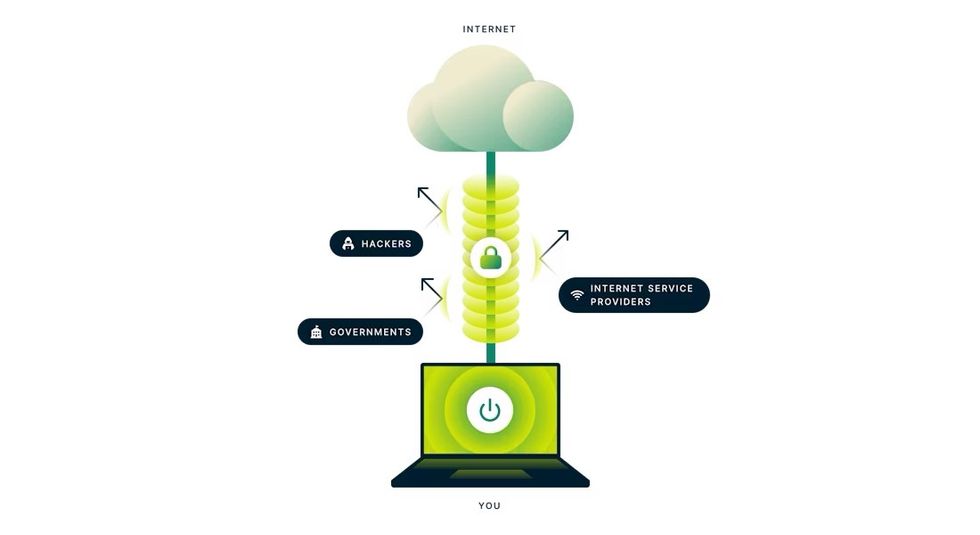 Virtual Private Networks, like ExpressVPN, mask your real location by routing traffic through servers in different countries, tricking services into thinking you're elsewhere | EXPRESSVPN PRESS OFFICE
 Based in the British Virgin Islands — outside Five Eyes jurisdiction — it avoids mandatory data retention laws, which means that even if the company were collecting data (it's not), law enforcement from the UK and US would be unable to compel ExpressVPN to hand over any information about its subscribers.
ExpressVPN supports a wide range of devices, including smartphones, tablets, laptops, smart TVs, and routers. There's no limit on the number of ExpressVPN apps that you can download on your devices, and with a single subscription, you can connect to the VPN on up to 10x gadgets at once.
It also has a dedicated team that optimises the service for major streaming platforms. Round-the-clock customer support is available if you encounter any issues during race weekend.
When it comes to buying a cheap VPN, ExpressVPN isn’t one of the cheapest. However, its 30-day money-back guarantee makes it a risk-free choice for privacy-conscious users and frequent streamers.
It should also give new customers the confidence to subscribe to one of its longer contracts, which unlock the biggest discounts.
More From GB News