










Freely is treating you to a pair of useful new features. And you might need to reboot your device to get your hands on the latest software update as quickly as possible.
Launched in the first half of 2024, Freely is built by the same team as Freeview and Freesat — projected to overtake both of these by the end of the decade. It ditches the traditional TV aerial, and the most popular free-to-air channels are streamed over a wireless or wired internet connection.
Freely has since become a prominent fixture across various smart TVs — including Fire TV and the recently released Roku TV at Currys. And if your telly doesn't have Freely built into it, like your Samsung or LG, then you can utilise Freely's recently released streaming devices like the Pleio and the Aero 4K TV streamer, which will plug into the back of any TV via an HDMI port.
Since Freely runs over Wi-Fi, as long as you have a plug socket and a good connection, you can enjoy all the same features the service has to offer. Everyone TV, the team behind the new platform, regularly delivers new software updates over that same Wi-Fi connection.
And the latest software update is rolling out to Freely viewers via Smart TVs and set-top boxes like the Netgem Pleio and Manhattan Aero right now. Here's what you can expect from the most recent release.

You can now preview more watch options with Freely's new mini guide at the bottom of your TV screen
|EVERYONE TV PRESS OFFICE
If you want to pick out what to watch next without leaving your current show or movie, you can now open the On Next tile on the right of the mini guide to see more options straight away.
It will give you the option to select Choose Watch Now, add it to My List, or explore more episodes. If the next programme is available on demand, you won't need to wait for it to go live — you can switch over and start watching immediately.
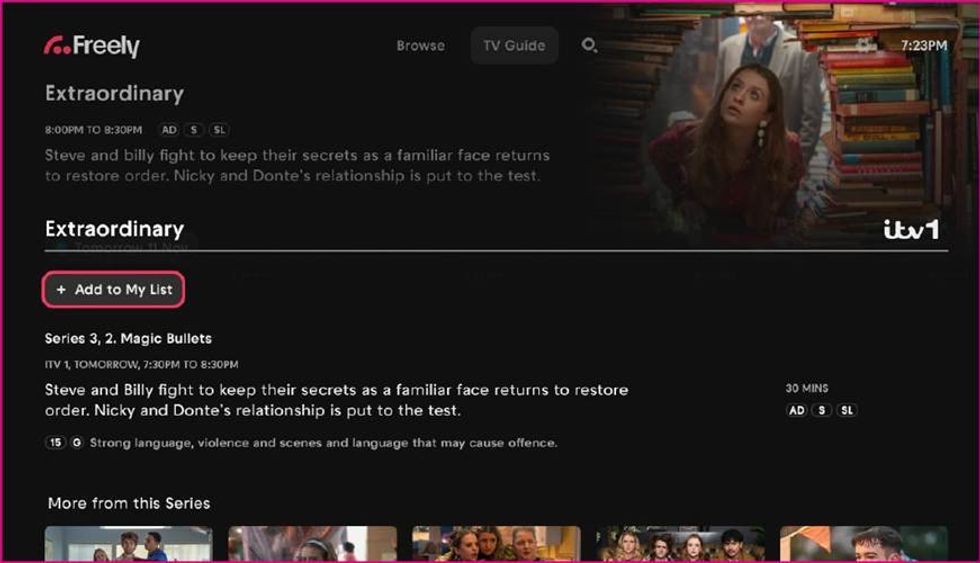
You can now keep track of what episodes you want to watch by being able to add individual TV episodes directly to My List
|EVERYONE TV PRESS OFFICE
To keep track of everything you want to watch, you can now add individual TV episodes directly to My List.
Similar to the new mini guide, you’ll see when the episode is next airing, or you can watch it straight away if it’s available on demand. To take advantage of this feature, you just need to select "Add to My List" from any content from within the TV guide.
LATEST DEVELOPMENTS
How to update your Freely TV and set-top box
Your freely-powered TV or set-top box should update automatically. However, you can always give it a manual refresh in your settings.
- Open Settings on your TV or streaming device
- Go to Software Update (sometimes under System, Support, or Device Preferences)
- Select Check for Updates and follow the on-screen instructions
- Keep the TV or box switched on until the update finishes
If you're ever unsure if your device is running the latest version, you can always check the software update page by clicking the link HERE.