



All products and promotions are independently selected by our experts. To help us provide free impartial advice, we will earn an affiliate commission if you buy something. Click here to learn more







Interest in the best VPN deals has surged since the Online Safety Act came into force, with a record number of Britons racing to download award-winning VPN services like ExpressVPN and NordVPN to encrypt the data on their phones, computers, and tablets.
VPNs are an essential piece of software to bypass age verification rules without a facial scan, hide your online activity from your broadband suppliers, and even access shows from abroad while on holiday. We recommend the award-winning ExpressVPN due to its speedy performance, having little to no impact on internet speeds and its price costing as little as £1.99 a month.
If we’ve convinced you to invest in ExpressVPN and you use Linux or you’re a bit confused, we’ve created a handy step-by-step guide to help you install the program. For those currently using other operating systems, such as Windows 10, Windows 11, and Mac, we have also created guides on installing ExpressVPN on those systems.
- How to install ExpressVPN on Mac
- How to install ExpressVPN on Windows 10
- How to install ExpressVPN on Windows 11
- How to install a VPN on your router
Secure a subscription to ExpressVPN for £1.99

Protect your personal information and encrypt everything you do online for just £1.99 with the latest ExpressVPN deal. This blockbuster sale trounces NordVPN, its biggest competitor.
ExpressVPN adds military-grade encryption across up to 10x devices, including iPhone, Android, Linux, Windows, Mac, Fire TV, and dozens more, to secure your internet traffic from prying eyes, advertisers, and governments. You'll benefit from an extra 4 months free with a two-year plan.
How to install ExpressVPN on Linux
One thing to check is whether or not your Linux operating system is compatible. Here’s a list of the ones that ExpressVPN supports:
- Ubuntu: 24.04 and above
- Debian: 10 and above
- Fedora: 30 and above
- Arch: Latest rolling release
- Raspberry Pi: Pi OS (64-bit)
- Mint: Linux Mint 20 and above
If either of your operating systems is compatible, then onto the next steps.
 With a single subscription to ExpressVPN, you can sign-in and use its award-winning VPN service on up to 10 devices | EXPRESSVPN PRESS OFFICE
 Choose your ExpressVPN price plan and go through payment
As we mentioned earlier, ExpressVPN has slashed 78% off its VPN plans, including its affordable Basic, Advanced, and pricier Pro plans. Each of these tiers arrives with different features.
While the Basic plan, priced at £1.99 per month, offers access to the same award-winning VPN with no limitations on speed or downloads on up to 10x devices, it misses out on some of the other trimmings.
For example, the ExpressVPN Advanced plan, priced at £2.79 per month, allows for the use of 12 devices with the program and provides advanced protection from ads, websites, and trackers.
It also comes bundled with its Keys password manager to encrypt and store login details for all of your online accounts, so you never reuse a password across different websites or online services, as well as threat protection features and its Identity Defender suite — monitoring your credit rating, removing your data from brokers, and immediately alerting you to Dark Web breaches.
Meanwhile, the ExpressVPN Pro plan, priced at £4.39 per month, comes bundled with everything we’ve mentioned, plus a dedicated IP address, 75% off an Aircove router, and an eSIM provided by holiday.com for five days of 5G data to use abroad — rather than paying extortionate roaming fees with your current provider.
After you complete the purchase, you will be prompted to create an account.
Download and install ExpressVPN
Once you’ve paid, head over to the ExpressVPN Linux setup page via your account and enter the verification code sent to your email. Afterwards, download the Download Universal Installer. When it’s been downloaded, open the Linux terminal, find the folder that it was downloaded to and run this command: sh [installer filename].
Enter your Linux password to continue and wait for the program to install then wait for it to open automatically.
After the window opens, you can sign in with an Email Sign-in link or your email and password. Once signed in, give the VPN permission to work on your device.
You might see prompts asking you to share analytics anonymously with ExpressVPN. Don’t worry because ExpressVPN doesn’t collect your private data and anonymises it before it reaches ExpressVPN servers.
Enjoy using ExpressVPN
After you’ve signed in and installed, you can now take advantage of ExpressVPN’s award-winning services and lightning-fast VPN connectivity. Simply click the On/Off button on the ExpressVPN app to connect using Smart Location which connects to a server that will provide the optimal experience.
If you want to connect to one of the 105+ countries that ExpressVPN provides, simply click the … button and choose the server that’s right for you.
If you want to disconnect from the server, click the On/Off button once again to disable ExpressVPN.
The great news about ExpressVPN it offers a quibble-free 30-day guarantee on all of its subscriptions.
It also has 24/7 customer support, so you'll be able to talk to someone from any time zone to get a full refund if you're unhappy with the experience on your devices or if the installation goes wrong.
LATEST DEVELOPMENTS
Benefits of ExpressVPN
ExpressVPN is particularly well-suited for streaming as it boasts VPN server locations in 105 countries, providing access to global coverage. It offers ultra-fast speeds on a 10-Gbps network, essential for high-quality streaming without buffering.
With military-grade encryption, a strict no-logs policy, and features like split tunnelling and a kill switch, your online activity stays private.
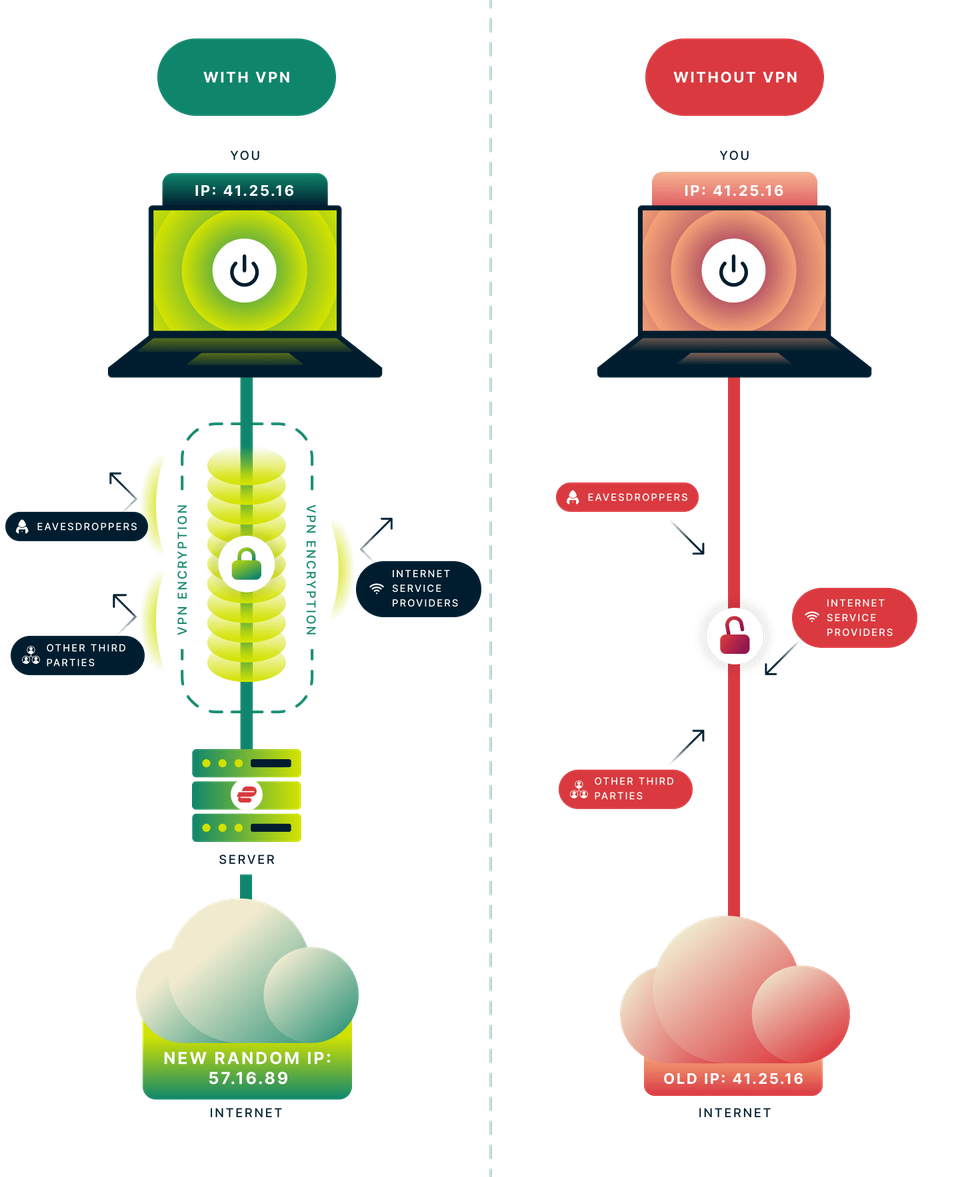 How Virtual Private Networks, more commonly referred to as VPNs, actually work and shield your internet history from prying eyes | EXPRESSVPN PRESS OFFICE
 Based in the British Virgin Islands — outside Five Eyes jurisdiction — it avoids mandatory data retention laws, which means that even if the company were collecting data (it's not), law enforcement from the UK and US would be unable to compel ExpressVPN to hand over any information about its subscribers.
ExpressVPN supports a wide range of devices, including smartphones, tablets, laptops, smart TVs, and routers. There's no limit on the number of ExpressVPN apps that you can download on your devices, and with a single subscription, you can connect to the VPN on up to 10x gadgets at once.
It also has a dedicated team that optimises the service for major streaming platforms. Round-the-clock customer support is available if you encounter any issues during race weekend.
When it comes to buying a cheap VPN, ExpressVPN isn’t one of the cheapest. However, its 30-day money-back guarantee makes it a risk-free choice for privacy-conscious users and frequent streamers.
It should also give new customers the confidence to subscribe to one of its longer contracts, which unlock the biggest discounts.
What is a VPN?
A Virtual Private Network (VPN) is software that protects and anonymises everything you do online.
VPNs can conceal your online activities by routing traffic through an encrypted tunnel that connects to secure servers worldwide. The most reliable VPNs employ the same encryption standard as governments in the United Kingdom and the United States, ensuring that even your Internet Service Provider (ISP) can't keep tabs on the websites you visit, the duration of your sessions on each site, or your current location.
This protection extends to advertisers, trackers, and hackers, preventing them from monitoring your online behaviour. Furthermore, personal information entered into online forms and sensitive data transmitted to and from your device will be safeguarded from hackers using strong encryption provided by a VPN.
Secure a subscription to ExpressVPN for £1.99
Protect your personal information and encrypt everything you do online for just £1.99 with the latest ExpressVPN deal. This blockbuster sale trounces NordVPN, its biggest competitor.
ExpressVPN adds military-grade encryption across up to 10x devices, including iPhone, Android, Linux, Windows, Mac, Fire TV, and dozens more, to secure your internet traffic from prying eyes, advertisers, and governments. You'll benefit from an extra 4 months free with a two-year plan.