



All products and promotions are independently selected by our experts. To help us provide free impartial advice, we will earn an affiliate commission if you buy something. Click here to learn more








For Brits who value privacy and security, securing the best VPN can be an invaluable tool on devices like phones, PCs, Macs and more. However, instead of installing a VPN on every device in the home, installing a VPN on your router can be a much more effective way to protect your entire network.
The introduction of the Online Safety Act means that many UK internet users are forced to verify their age, or some sites have blocked access to sites altogether. But for those who are willing to invest the time and the effort to install a VPN on a router, it can be a way to ‘set-and-forget’ while making sure your entire network is secure.
However, for those interested in how to set it up and how it works, here’s a quick rundown of how to do it:
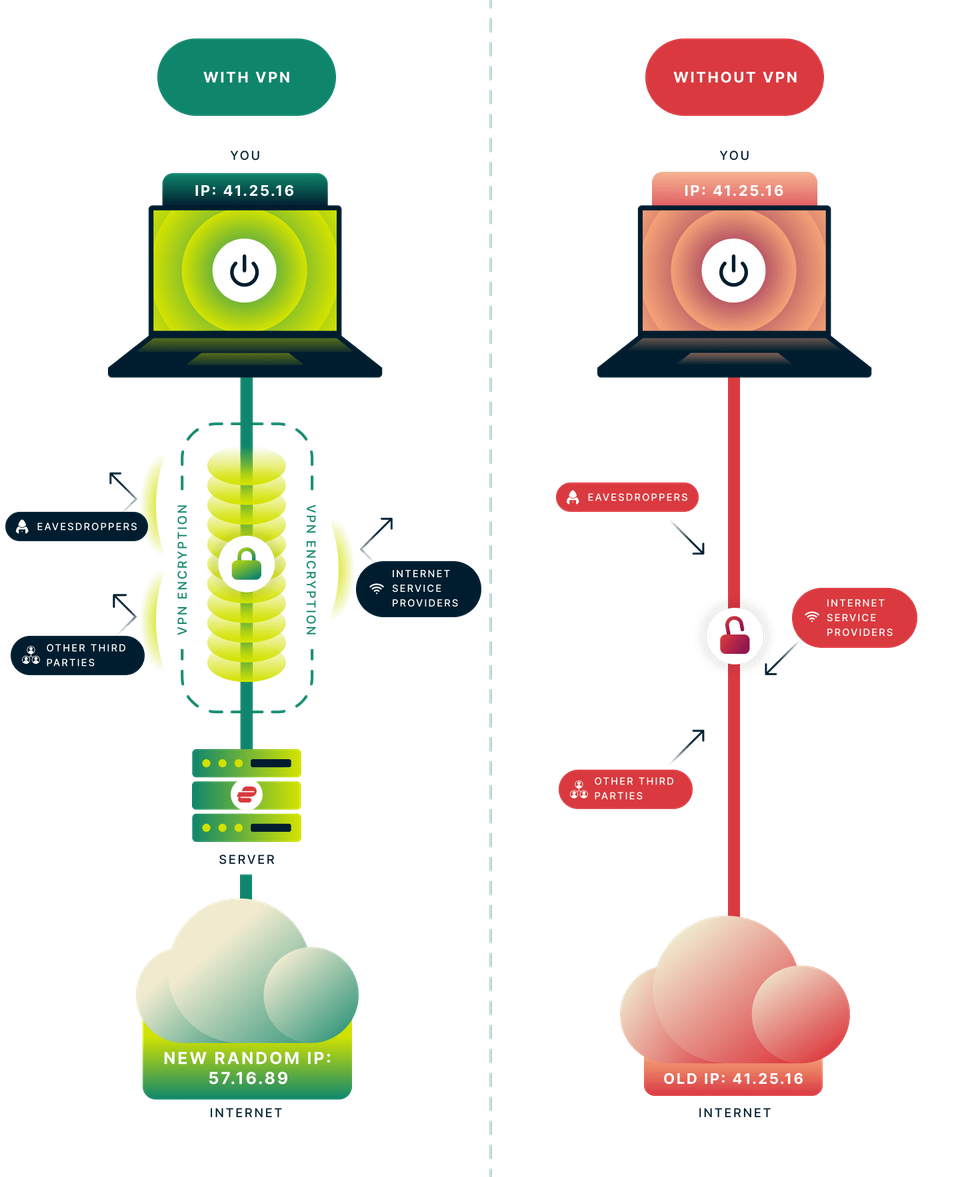
How Virtual Private Networks, more commonly referred to as VPNs, actually work and shield your internet history from prying eyes
| EXPRESSVPN PRESS OFFICEWhy should you use a VPN on your router
As we explained earlier, most households can set up a VPN on every single device to make sure that each device can reroute its internet traffic through a secure VPN server. This can help protect from ISPs finding out about your browsing habits and accessing sites from other countries, which may block UK IP addresses.
But for those who regularly use VPNs, installing them on every smart device you own can be time-consuming, which is where installing on a router can be very useful.
By installing on a router, households can ensure that every single device that uses that router and the internet will be protected by the safety of a VPN.
Subscribe to ExpressVPN for £1.99 per month
 Subscribe to ExpressVPN for £1.99 per month
Protect your personal information and encrypt everything you do online for just £1.99 with the latest ExpressVPN deal. This blockbuster sale trounces NordVPN, its biggest competitor.
ExpressVPN adds military-grade encryption across up to 10x devices, including iPhone, Android, Linux, Windows, Mac, Fire TV, and dozens more, to secure your internet traffic from prying eyes, advertisers, and governments. You'll benefit from an extra 4 months free with a two-year plan
[countdown-2025-12-27]
Pros and cons of setting up a VPN on your router
Setting up a VPN on a router can have its pros and cons for those who value privacy. Here’s a quick explanation of the benefits and the not-so-benefits of setting one up:
Pros
- Protection for every single device that accesses the internet
- No need to turn on a VPN every time you use a device
- Every member of the household is protected without the need for multiple logins
- Once it’s set up, there’s no need to worry about it anymore
Cons
- Can be tricky to set up for non-tech-savvy individuals
- Not every single router will allow for a VPN to be set up
- Internet speeds can be impacted
- Less flexibility if you want to access other countries’ servers
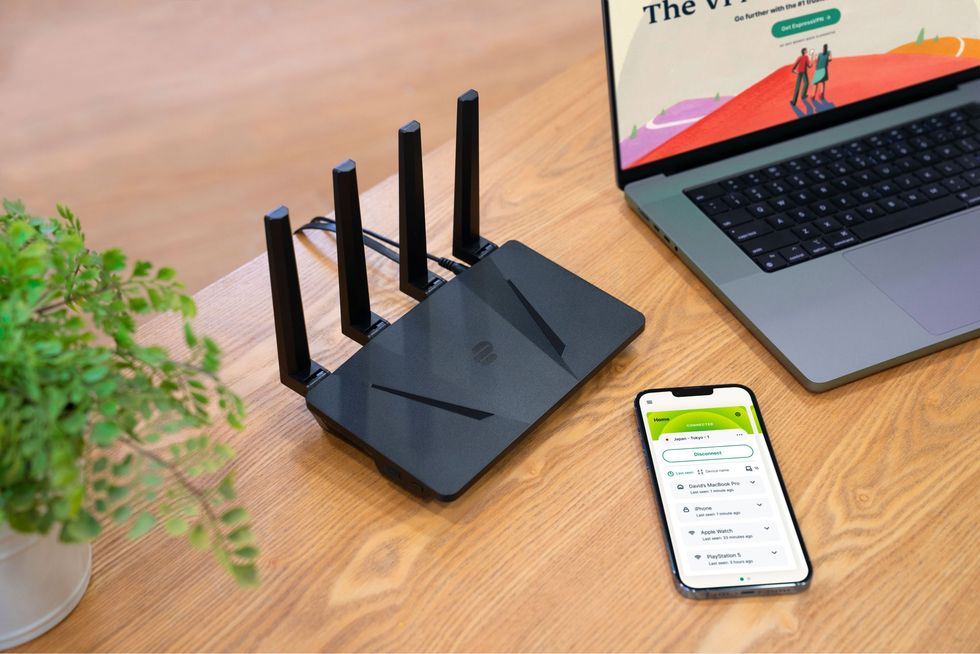
Kape Technologies has developed a dedicated Wi-Fi router, dubbed the Aircove, that secures every device connected to the internet
|KAPE TECHNOLOGIES
How to set up a VPN on your router
Setting up a VPN on your router can be tricky depending on your technical know-how, but we’ve put together a quick step-by-step guide on how to make the process go smoothly:
- Ensure your router is compatible with VPNs – some routers may not be compatible with VPNs; however, most modern routers should have the option. If you haven’t updated your router recently, this may help
- Log in to your router settings – begin by typing your router’s IP address into an internet browser. It should ask you for a username and a password. This should be located on the router itself
- Find the VPN option within your router’s settings – Look around in the router’s settings and find a VPN option. This should allow you to configure a VPN profile on your router
- After setting up, check that it works – After it's configured, find a device connected to the router and the internet, then use a site like What’s My IP? to check that it has worked
One thing to note is that every single router may not be compatible with VPNs, and some routers even have VPNs pre-configured into their settings.
Some ISP-provided routers from the likes of EE, Sky or Virgin Media may not allow for a VPN to be configured, whilst store-bought routers may potentially be compatible with a VPN.
What VPN should you use for a router?
As we mentioned, it’s massively important to make sure you get a premium VPN service for your router. Speeds can be affected when configuring a VPN for all connected devices, which is why getting a premium VPN is crucial and avoid a free VPN.
We highly recommend ExpressVPN – one of the best VPNs on the market right now. The good news is that it currently has one of its lowest prices ever, just in time for Christmas.
ExpressVPN offers military-grade encryption for all your online activities, keeping your browsing history secure from government surveillance and online advertisers. It’s one of the fastest VPNs on the market and offers a no-quibbles 30-day guarantee so you can try out every feature on every device before deciding whether to move ahead with the full 24-month contract.
ExpressVPN can also be run on up to 10 devices of your choice with its £1.99 Basic plan, connecting to over 3,000 servers worldwide, including a dedicated location in every US state. There's also its top-tier post-quantum encryption — a feature that sets ExpressVPN apart from its competitors.
VPN encryption adds some overhead when it comes to speeds, which can reduce speeds depending on your router’s processing power, your internet plan, and distance to the VPN server. Thanks to ExpressVPN’s Lightway protocol, it minimises the impact on your internet speeds and router itself.
ExpressVPN also has other plans, including its £2.49 Advanced plan that includes a password manager, 12 simultaneous devices and an Advanced Protection suite that helps block ads, trackers and malicious sites.
There’s also its £4.39 ExpressVPN Pro plan, which comes with a dedicated IP that’s exclusive to you, 75% off an Aircove router, and a 5-day eSIM to be used with iPhone, thanks to holiday.com.