









Google Chrome has finally caught up with its rivals. With the latest update, you can arrange your browser tabs vertically on the side of your web browser window, rather than running along the top like you're accustomed to.
If you regularly keep dozens of tabs open, you’ll know how quickly things become chaotic. Pages blur into a row of tiny icons, and finding what you need turns into guesswork. With vertical tabs, you should still be able to read full page titles at a glance, making it easier to stay oriented and switch between tasks without losing track.
That's because the page titles expand and retract on the left-side of the browser when not in use.
Mozilla Firefox launched vertical tabs back in March 2025, but Microsoft was really ahead of the curve with this one. It launched vertical tabs back in 2021, although an update in April 2026 renewed focus on this feature, promoting it after you launch the app following an update.
It's not the only addition from Google, which has also added a new full-page reading mode — a small tweak that could change how you experience everyday browsing. It's designed to fight cluttered webpages packed with ads, pop-ups, and sidebars. Reading mode strips everything back so you can concentrate on the content itself.
Expanding it into a full-page view gives you a cleaner, more immersive layout that’s better suited to longer articles or deep reading sessions. Again, this has been available in Microsoft Edge and Mozilla Firefox too.
"We are beginning to roll out two new features designed to streamline your browser and help you maximise productivity in Chrome," said the US tech firm in a blog post. Here's how you can access them.
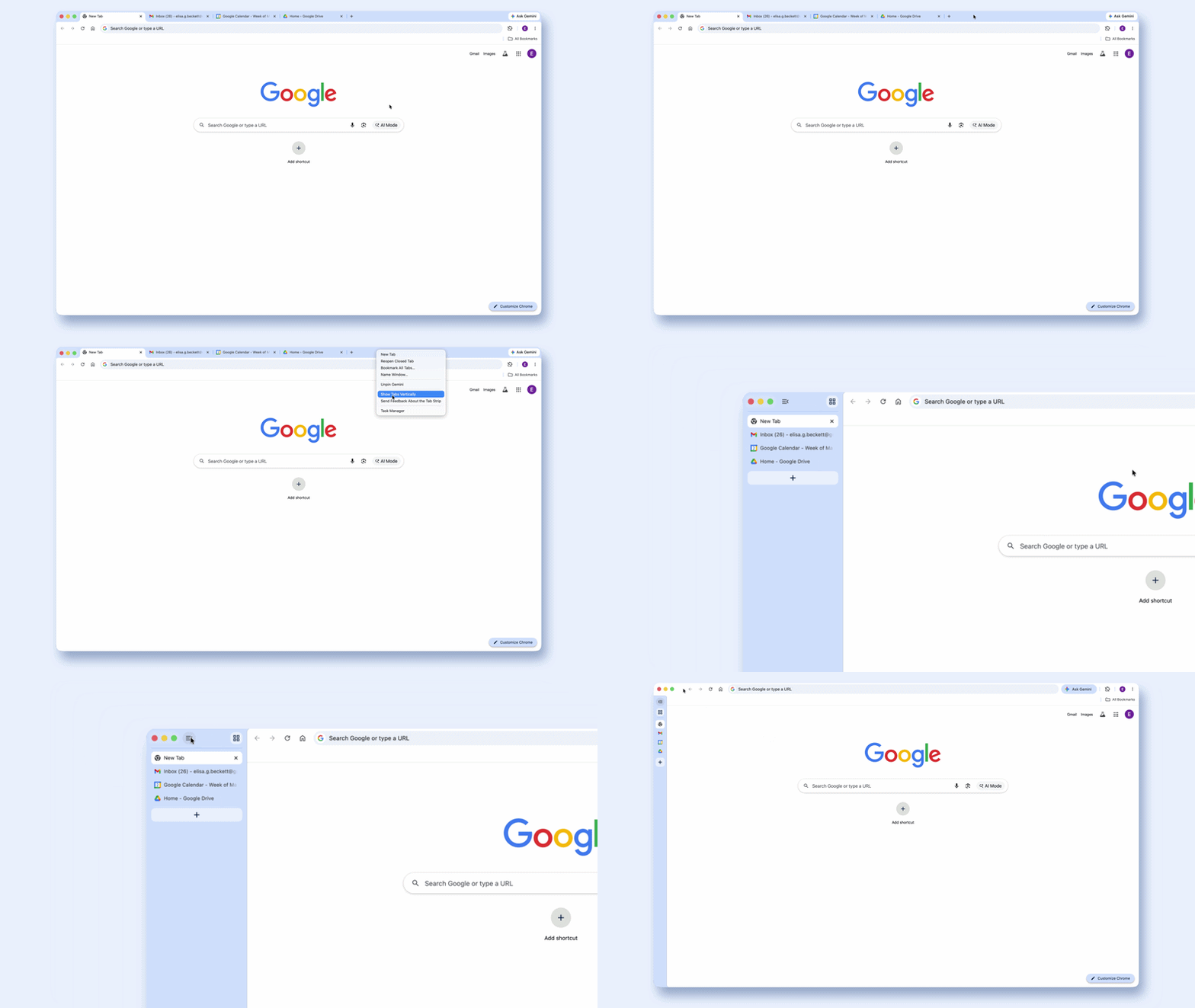
You can now arrange your browser tabs vertically along the side of your window with the latest Chrome update
|GOOGLE PRESS OFFICE
Getting started, just right-click anywhere on your Google Chrome browser window and select "Show Tabs Vertically" from the menu that pops up. Once you've done that, all your open tabs shift over to a neat column on the left-hand side of your browser.
The beauty of this layout is that you can actually read the full titles of your pages, even when you've got loads of tabs open. No more squinting at tiny icons trying to work out which tab is which.
There's no limit on how many tabs you can have open, either, which is ideal if you're the sort of person who treats their browser like a research library. Want to switch back? Simply right-click in the vertical panel and hit "Show tabs at the top" to return to the classic horizontal view.
LATEST DEVELOPMENTS
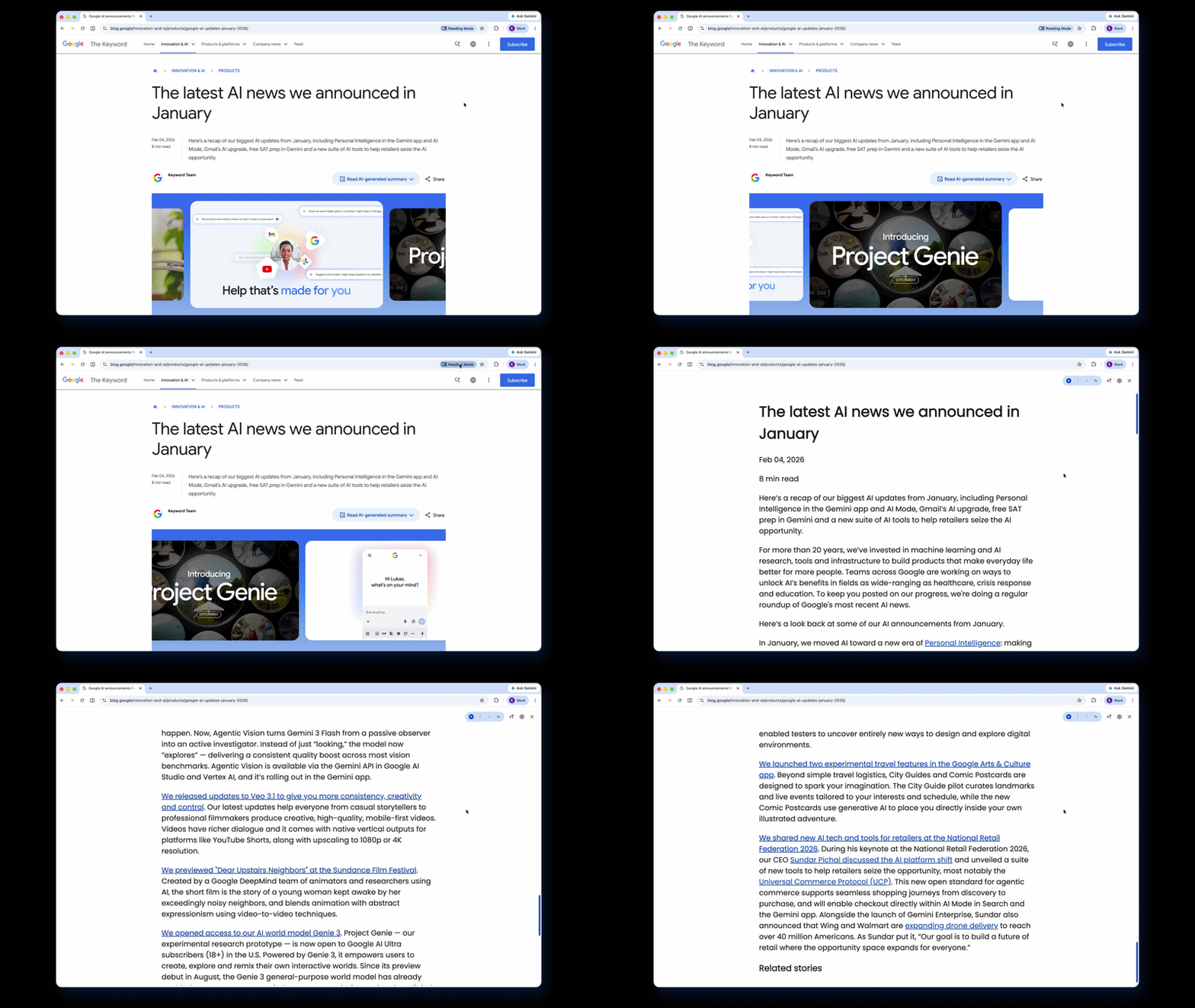
Chrome's reading mode is a great option for moments when you're trying to concentrate on the page of a website, but it's heavy with distractions
|GOOGLE PRESS OFFICE
Chrome's reading mode has also had a lovely makeover. Previously, it sat in a narrower side panel, but now it takes over your entire screen for a more immersive experience.
To try it out, right-click on any webpage and select "Open in reading mode." You can also tap the Reading Mode icon in your address bar if you're on a desktop.
It strips away all the clutter – adverts, flashy graphics, sidebars – and leaves you with just the text you came to read. It's great for those moments when you're trying to concentrate on the page of a website, but the page has several distractions.
Both features are rolling out gradually, so keep an eye out and make sure to update your Chrome to the latest version.