









It feels like a scary time for Android users. Hackers have found a way to bypass mobile passcodes in just 45 seconds, over a hundred security flaws were recently discovered in the Android operating system, and fraudsters have been hiding malware in your TV streaming apps.
On top of that, some of the best VPN apps (Virtual Private Networks) — used to protect your online activity — are breaking across millions of Android devices.
To combat all of this fraudulent activity, Google is shaking up the rules for millions of Android users, making it tougher to download apps outside of the Play Store, but it's not available to everyone by default. You'll need to manually toggle this on with the steps found below.
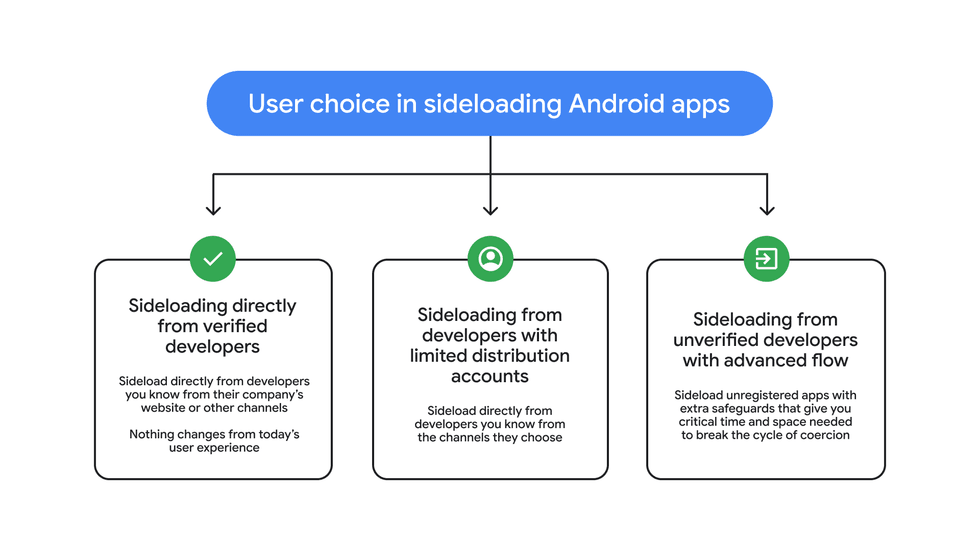
The latest plan from Google to combat fraudulent apps introduces an "advanced flow" – essentially a slower and more protective process for sideloading apps from developers who haven't been verified.
Sideloading, one of the key differentiators between Android and iOS that dates back to the very beginning of the two operating systems, allows Android phone and tablet owners to install software from outside of the Play Store.
With the latest rules from Google, whenever you want to install an app from an unverified source, you'll need to wait 24-hours before you can actually download it onto your phone. The reason? It's all designed to protect you from scammers who hide behind dodgy software disguised as an app.

Sideloadinng allows Android phone and tablet owners to download and install software from outside of the Play Store
|Hackers often rely on urgency to trick you into downloading unsafe apps or clicking on malicious links. They depend on rushed decisions because slowing down puts you back in control and helps protect your personal information, money, and digital security.
They create panic — claiming your account is at risk or that you must act immediately — so you don’t have time to think clearly. A simple 24-hour pause can make a huge difference. It gives you space to breathe, reassess the situation, and recognise red flags you might have missed in the moment.
How to spot a scam
Here are a few examples of how to spot when a fraudster is trying to trick you:
- Messages that pressure you to act immediately
- Unexpected alerts about account issues or security threats
- Links to download apps outside official app stores
- Poor grammar, spelling, or unusual formatting
- Requests for personal or financial information
- Sender addresses that look slightly “off” or unfamiliar
- Offers or threats that feel extreme or unrealistic
Fraudsters take advantage of sideloading by hiding malware in dodgy apps that have not been verified by official app stores
|Malware that wouldn't pass Google's security checks for the Play Store can still be installed via sideloading — pushing hackers to often suggest this method over the Play Store.
If you want to continue sideloading apps, it's a smart move to add this 24-hour delay. The new security system is a one-time setup, and once you've jumped through the hoops, you can choose to keep sideloading privileges active for seven days or indefinitely.
The process has a total of four steps before you can begin downloading apps. It's not enabled automatically, and must be manually allowed by switching on Developer Mode in your settings.
Google says it'll enable the new system from August, so you'll need to wait before everything is live. When the "advanced flow" for sideloading is available, you'll need to follow these 5 steps to toggle on Developer Mode:
- Open Settings
- Go to About phone
- Tap Build number 7 times
- Enter your PIN/password if prompted
- You’ll see “You are now a developer”
Next, you'll find a screen that asks you to confirm nobody is pressuring you to turn off your security settings. You'll need to confirm that nobody is coercing you.
While this might seem like a tedious step, fraudsters are often known for adding a sense of urgency to their scam attempts so that you're more likely to download the faulty app.
Then you'll have to restart your phone. This clever step cuts off any active calls or screen-sharing sessions that scammers might be using to guide you through the process.
After all that, you wait 24 hours, then verify your identity using your fingerprint, face, or device PIN before you can finally install the app.
LATEST DEVELOPMENTS
In addition to this, starting in September, anyone creating and distributing apps outside the Play Store will need to verify their identity with Google.
That means handing over details like your legal name, address, email, and phone number. In some cases, you'll also need to provide a copy of a government-issued ID and pay a $25 registration fee, which equates to about £20.
When the verification was first announced last summer, users were not happy. Many had said this was another way that the internet is being controlled.
No one wants a closed and controlled internet.
— JW Weatherman (@JWWeatherman_) August 29, 2025
By making every app developer establish a relationship with a corporation you are destroying what we love - the freedom to interact with each other and with code without permission.
Although Google is allowing hobbyists and students to bypass the verification process. If you're just tinkering with apps or sharing your creations with mates, you can get a free limited distribution account.
This lets you share your apps with up to 20 devices without needing to fork over your ID or pay anything.