


All products and promotions are independently selected by our experts. To help us provide free impartial advice, we will earn an affiliate commission if you buy something. Click here to learn more







The popularity of VPNs has surged in the UK, with more Britons looking to leverage these security apps than ever before. VPNs can be used to hide your browsing history, disguise your current location, and unlock new streaming services, or new shows, sports, and movies in existing streamers.
But that's not all, as VPNs can also let you watch your favourite shows from abroad, help you unearth aeroplane tickets and train fares at a discount rate, and make sure you’re protected from hackers who want to steal your details. However, it’s all well-and-good looking at VPNs, but how do you use one, and how hard is it to navigate?
Not everyone is the most tech-savvy when it comes to certain pieces of software, so we’re going to give you an easy guide on how to use a VPN — as well as a few of the best VPN deals — so it’s as easy as possible to get up and running and guarantee that you're protected.
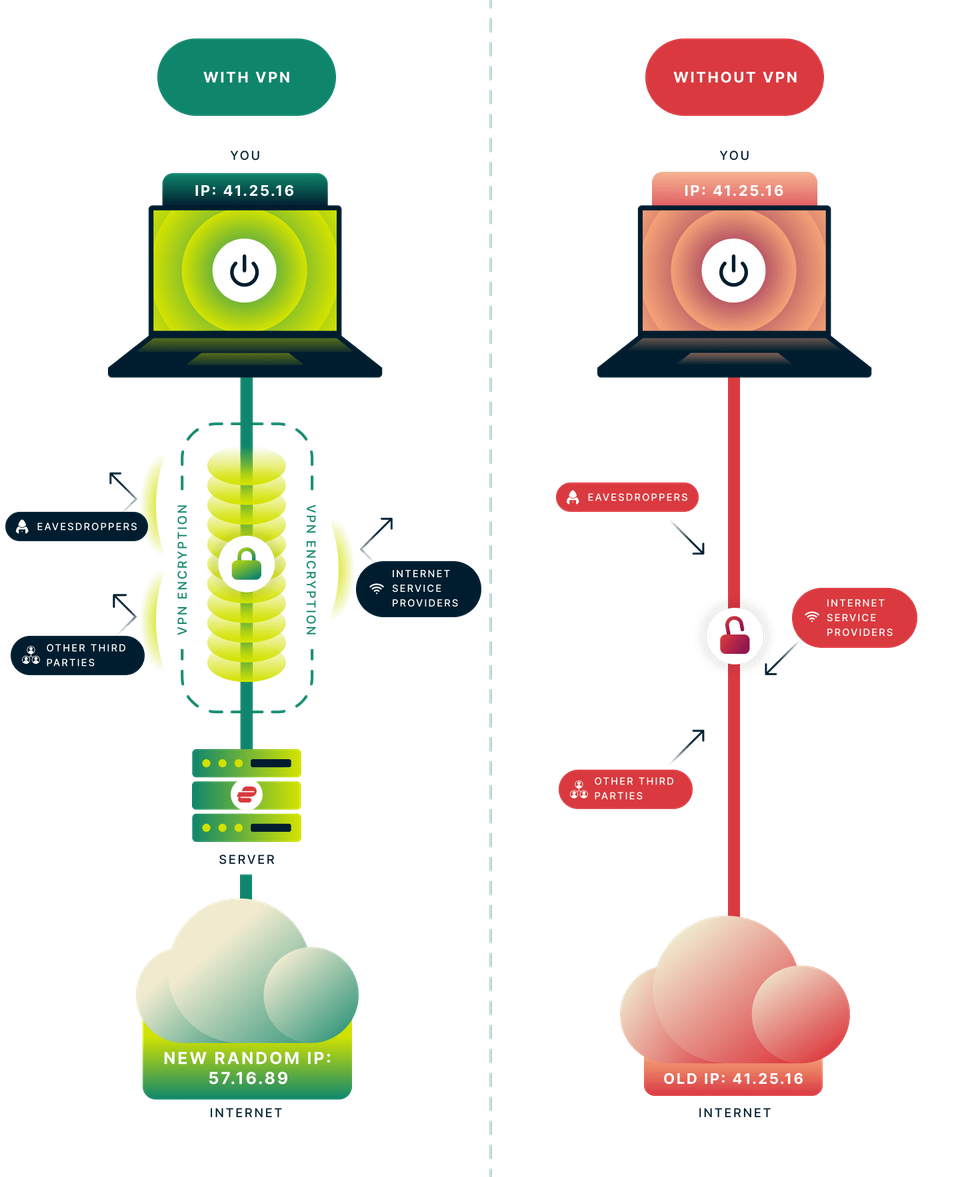 VPNs work by encrypting all of your online traffic before it's sent over the internet. This prevents your ISP, advertisers, hackers, and fraudsters from tracking your online activity, stealing your personal data, or placing restrictions on you | EXPRESSVPN PRESS OFFICE
 What is a VPN?
A Virtual Private Network (VPN) is software that protects and anonymises everything you do online. VPNs can conceal your online activities by routing traffic through an encrypted tunnel that connects to secure servers worldwide.
The most reliable VPNs use the same encryption standards as governments in the United Kingdom and the United States, ensuring that even your Internet Service Provider (ISP) on Wi-Fi cannot record the websites you visit, the duration of your sessions on each site, or your current location. This protection extends to advertisers, trackers, and hackers, preventing them from monitoring your online behaviour.
Furthermore, personal information entered into online forms and sensitive data transmitted to and from your device will be safeguarded from hackers using strong encryption provided by a VPN.
VPNs are designed to secure everything you do online with military-grade encryption, keeping your personal details and location under lock-and-key
|UNSPLASH
How do you use a VPN?
Using and setting up a VPN is very easy, and you don’t need to be good at computers to set one up. Most can be installed on different PCs, including Windows, macOS, Linux, as well as iPhones and Android devices.
Setting up a VPN is also easy, and some devices may ask for permission to access certain system settings. Most programmes will give you an easy guide on how to do this, so you can use it straight away.
When it is installed, log in with your account on the VPN.
The app will walk you through the process, and it shouldn’t take longer than five minutes. When you’re logged in, most VPNs have an option to turn on the VPN by the click of a button automatically, and it will connect to a preferred server location that’s the speediest and provide the best connection to you.
Subscribe to ExpressVPN for just £1.99 – just 6 pence a day

rotect your personal information and encrypt everything you do online for just £1.99 with the latest ExpressVPN deal. That equates to just 6p a day for military-grade encryption across 10x devices.
Unsurprisingly, this blockbuster sale trounces NordVPN, its biggest competitor.
ExpressVPN boasts apps for iPhone, Android, Linux, Windows, Mac, Fire TV, and dozens more, to secure your internet traffic from prying eyes, advertisers, and governments. We praised its speed and reliability in our ExpressVPN review. For a limited time, you'll benefit from an extra 4 months free with a two-year plan
[countdown-2026-04-22]
Get 80% off ExpressVPN Basic
$9.99
$1.99
However, the good news is that VPNs also give users the choice to connect to specific server locations across the world. Simply choose the country you wish to connect to and click to connect to the VPN server.
And voila. You should be connected to the VPN, and it’s as easy as that. It should work in the background while you’re browsing, streaming or doing anything else.
For those users who really want to fiddle with the internals of the VPN, most VPNs also have advanced features that can be used to ensure you get the best privacy possible and set it up for your own personal needs. VPNs can also be set up and used for other things, like your router – making sure every protection on your network is secure.
LATEST DEVELOPMENTS
Why should you use ExpressVPN
When it comes to ease of use, ExpressVPN is one of the easiest VPNs to set up and use because it has a big button that won’t be missed that’ll connect you to the VPN instantly. It also lets you choose your VPN server and country extremely fast, thanks to its intuitive interface that everyone can understand.
ExpressVPN is an award-winning VPN with gongs from the likes of Techradar, CNET, and Tom's Guide, with praise for its servers dedicated to fast, reliable streaming from anywhere in the world.
Monthly prices start from £1.99 a month, and unlock ExpressVPN across up to 14 devices. Once installed, connect to a UK server from ExpressVPN's network of over 3,000 servers across 105 countries.
The service uses proprietary Lightway protocol for enhanced speed and reliability, ensuring smooth streaming of festival performances. The service works across all your devices – Windows, Mac, Android, iOS, smart TVs and streaming devices like Fire TV Stick. You can even use ExpressVPN's MediaStreamer feature to watch on devices that don't normally support VPNs, such as PlayStation or Xbox.
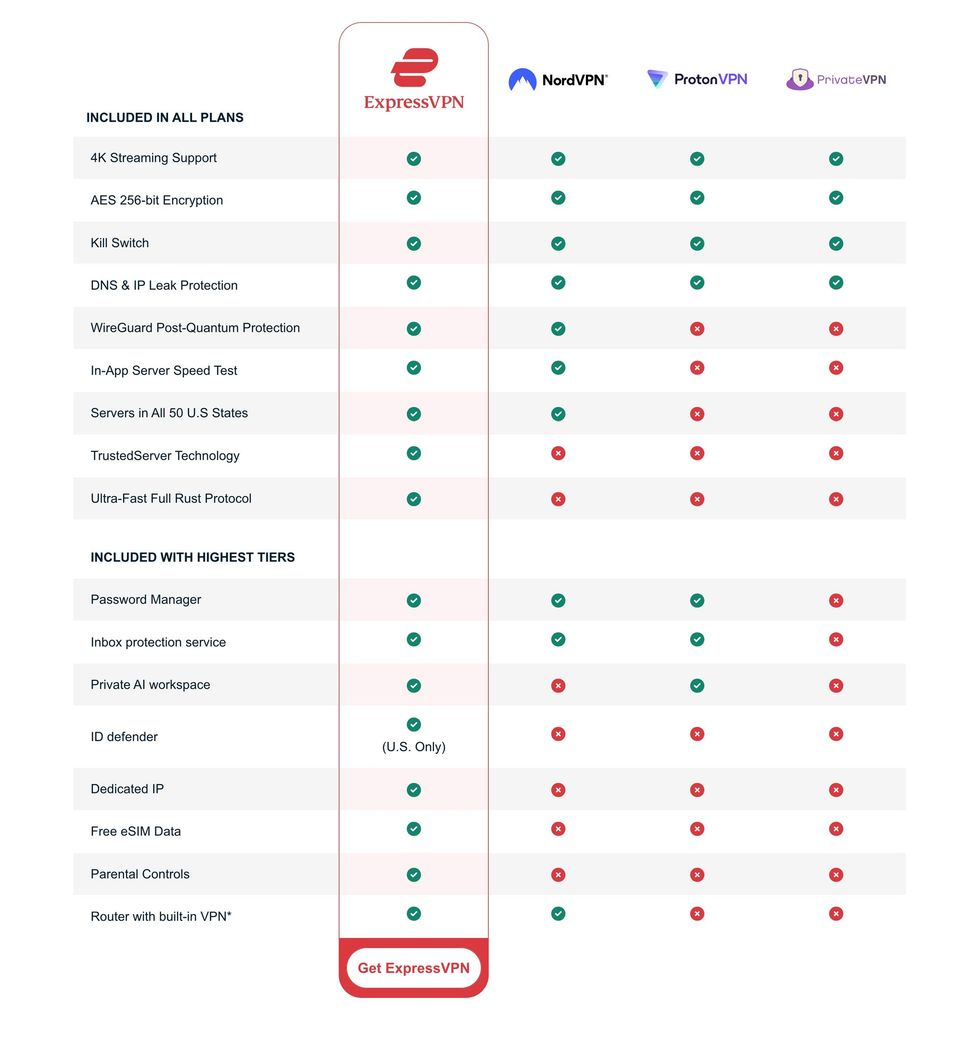
Comparison between ExpressVPN, NordVPN, Proton, and PrivateVPN to highlight the different features available with each of these subscriptions
|KAPE TECHNOLOGIES
Benefits of ExpressVPN
ExpressVPN is particularly well-suited for streaming, gaming and protecting your privacy as it boasts VPN server locations in 105 countries, providing access to global coverage.
It offers ultra-fast speeds on a 10-Gbps network, essential for high-quality streaming without buffering. With military-grade encryption, a strict no-logs policy, and features like split tunnelling and a kill switch, your online activity stays private.
Based in the British Virgin Islands — outside Five Eyes jurisdiction — it avoids mandatory data retention laws, which means that even if the company were collecting data (it's not), law enforcement from the UK and US would be unable to compel ExpressVPN to hand over any information about its subscribers.
ExpressVPN supports a wide range of devices, including smartphones, tablets, laptops, smart TVs, and routers. There's no limit on the number of ExpressVPN apps that you can download on your devices, and with a single subscription, you can connect to the VPN on 10x gadgets at once.
It also has a dedicated team that optimises the service for major streaming platforms. Round-the-clock customer support is available if you encounter any issues during race weekend.
ExpressVPN isn't the cheapest VPN. However, its 30-day money-back guarantee makes it a risk-free choice for privacy-conscious users and frequent streamers. It should also give new customers the confidence to subscribe to one of its longer contracts, which unlock the biggest discounts.