


All products and promotions are independently selected by our experts. To help us provide free impartial advice, we will earn an affiliate commission if you buy something. Click here to learn more







VPN popularity has surged in recent months with the introduction of the Online Safety Act, meaning many Britons have been forced to make age verification checks on adult sites, online chatrooms, and gaming services.
This has led to a massive surge in VPN searches and downloads, with many UK households wondering whether they should download and invest in one of the best VPN deals.
VPNs can be a highly useful tool while browsing the internet, ensuring ISPs can’t monitor your internet activity and access UK streaming services while abroad on holiday.
But for those who might be jumping into the confusing and complicated world of VPNs and wondering if they are even using a VPN, we have all the information you need to find yourself grounded and confident in understanding VPNs and how they can be massively beneficial.
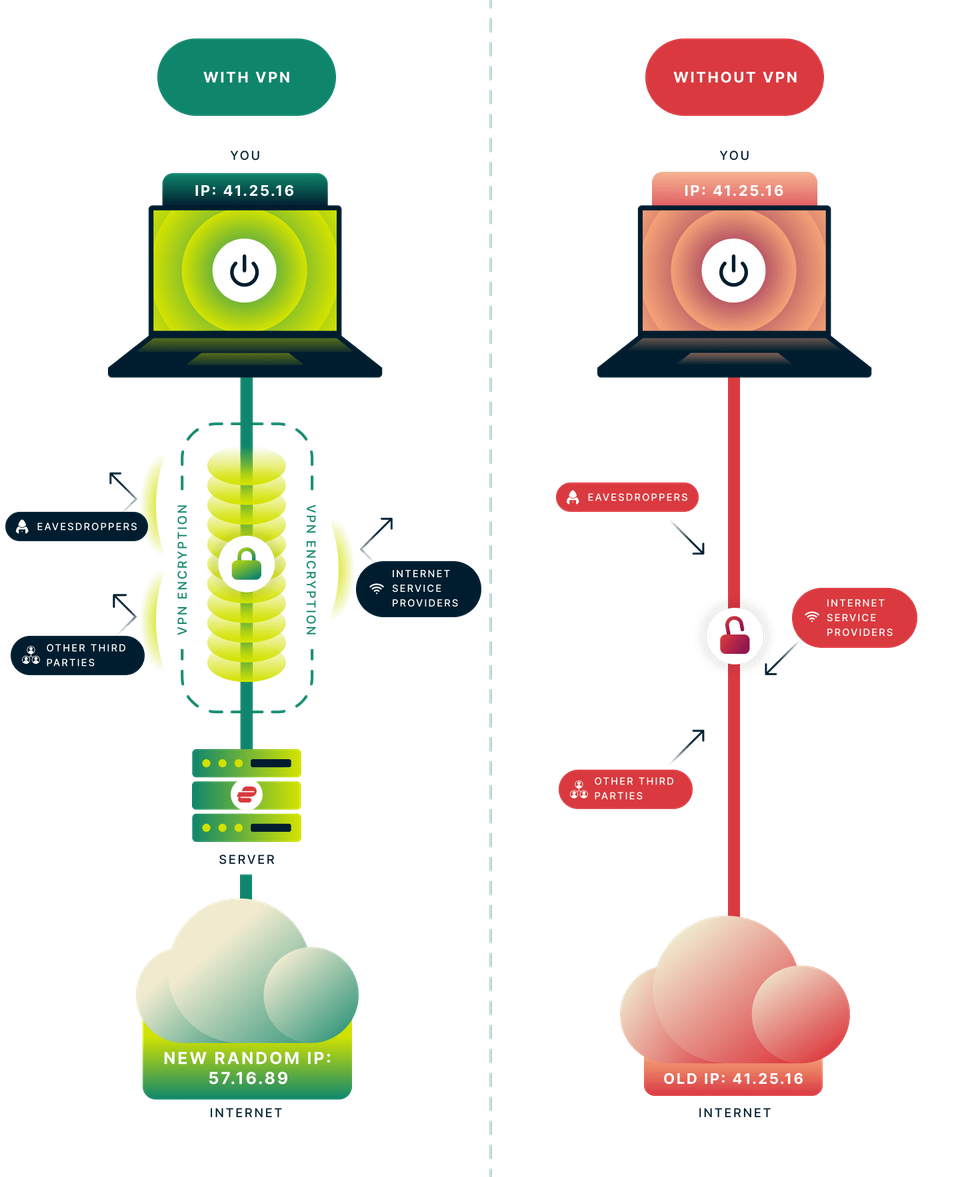 How Virtual Private Networks, more commonly referred to as VPNs, actually work and shield your internet history from prying eyes | EXPRESSVPN PRESS OFFICE
 What is a VPN?
A Virtual Private Network (VPN) is software that protects and anonymises everything you do online. VPNs can conceal your online activity by routing traffic through an encrypted tunnel to secure servers worldwide.
The most reliable VPNs use the same encryption standards as governments in the United Kingdom and the United States, ensuring that even your Internet Service Provider (ISP) on Wi-Fi cannot record the websites you visit, the duration of your sessions on each site, or your current location. This protection extends to advertisers, trackers, and hackers, preventing them from monitoring your online behaviour.
Furthermore, personal information entered into online forms and sensitive data transmitted to and from your device will be safeguarded from hackers using a VPN's strong encryption methods.
Subscribe to ExpressVPN for £1.99 per month

Protect your personal information and encrypt everything you do online for just £1.99 with the latest ExpressVPN deal. This blockbuster sale trounces NordVPN, its biggest competitor.
ExpressVPN adds military-grade encryption across up to 10x devices, including iPhone, Android, Linux, Windows, Mac, Fire TV, and dozens more, to secure your internet traffic from prying eyes, advertisers, and governments. You'll benefit from an extra 4 months free with a two-year plan
Am I using a VPN?
If you’re using a personal computer, chances are you aren’t using a VPN right now unless you have downloaded a VPN program like ExpressVPN.
Most programs like these require users to connect to the service manually every time they log on, but many services can also auto-connect whenever you connect to the internet.
Windows users can check the bottom-right System Tray for any VPN programs that might be connected, while Mac users can choose Apple menu, then browse to System Preferences and then Network.
That should indicate whether a VPN is in use at the time. But for most devices, connecting to a VPN requires using a program to connect to a network.
However, some routers can also be configured to run a VPN service. Most routers don’t have this already installed unless you have done it yourself. You can learn how to install a VPN on your router.
How do I use a VPN?
A VPN is very easy to use – and takes only minutes to set up once downloaded. If you decide to download one of the best VPNs, ExpressVPN.
To set up ExpressVPN, go here and choose the plan that suits you. Afterwards, log into your account and download the app. It’s available on PC, Mac, iPhone, Android and loads of other devices.
Then find the activation code and use that when prompted, or you can log in to your account associated with the purchase. You might see a few prompts on your phone or computer, asking for permissions for ExpressVPN to work correctly.
And voila! ExpressVPN will do all the hard work in the background and ensure that you can connect without hindrance. To connect to a server location, click the one button on the app. By default, ExpressVPN will suggest the location that provides the optimal experience for you, called Smart Location.
Once you see the Connected message on the app screen, you can begin surfing with freedom and security.
Which VPN should I use?
While there are loads of VPNs to choose from, one of our favourite VPN services is ExpressVPN. Not only because it’s super speedy in terms of connecting to servers, and you’ll hardly see an effect on internet speeds. It also has a super-friendly user interface – perfect for those who might just be starting out into the world of VPNs.
ExpressVPN offers lightning-fast connections on many devices, including PCs, Macs, iPhones, Android and much more. Users will also enjoy their choice of over 3,000 servers worldwide, including a dedicated location in every US state.
There's also its top-tier post-quantum encryption — a feature that sets ExpressVPN apart from its competitors.
ExpressVPN will also bundle four months of extra access at no cost — so you'll be able to encrypt and secure your connection for 28 months without paying any more than a two-year plan. And if you’re not happy, it includes a quibble-free 30-day guarantee on all of its subscriptions. With 24/7 customer support, you'll be able to talk to someone from any time zone to get a full refund if you're unhappy with the experience on your devices.
ExpressVPN also uses AES (Advanced Encryption Standard) with 256-bit keys - also known as AES-256. It’s the same encryption standard adopted by the U.S. government and trusted by security experts worldwide to protect classified information.
ExpressVPN recently unveiled the biggest shake-up to its subscriptions in 16 years earlier this summer. It ditched its one-size-fits-all approach in favour of three price plans: Basic, Advanced, and Pro.
The decision to offer different plans enables this award-winning VPN to be more competitive. Basic subscribers spending just 6p a day to access ExpressVPN will still benefit from its core VPN features, costing only £1.99 a month on its two-year plans.
For those who want to invest a little more, Advanced subscribers who pay £2.79 a month will benefit from its Keys password manager, plus three days of unlimited mobile data to use anywhere on the planet via an eSIM plan courtesy of Holiday.com.
There’s also its Pro subscription for £4.39 a month, which includes everything from the more affordable tiers, plus 5 days of eSIM data and monthly credit reports. There’s even a dedicated IP address that is exclusive to you and private, which means even ExpressVPN can’t trace back to you.
The device limit also increases to 14, and you'll receive up to 75% off Aircove routers, which run ExpressVPN software so that every device connected to Wi-Fi is secured via VPN.