










Hackers could take over your WhatsApp account – and you wouldn't receive a single alert.
There's a new scam targeting the world's most popular messaging platform, called GhostPairing, which exploits the app’s own convenience features against you, allowing criminals to hijack your account in silence — without password cracking, encryption breaking, or even a warning.
Cybersecurity researchers at Avast have uncovered this sophisticated new scam that bypasses security measures built into WhatsApp. To achieve this, hackers exploit the ability to link additional devices to your account, so you can send and receive WhatsApp messages from both your phone and laptop, and you never miss a message again.
But by manipulating this handy function, hackers can quietly connect their own browser to your WhatsApp, granting them the same access you have now.
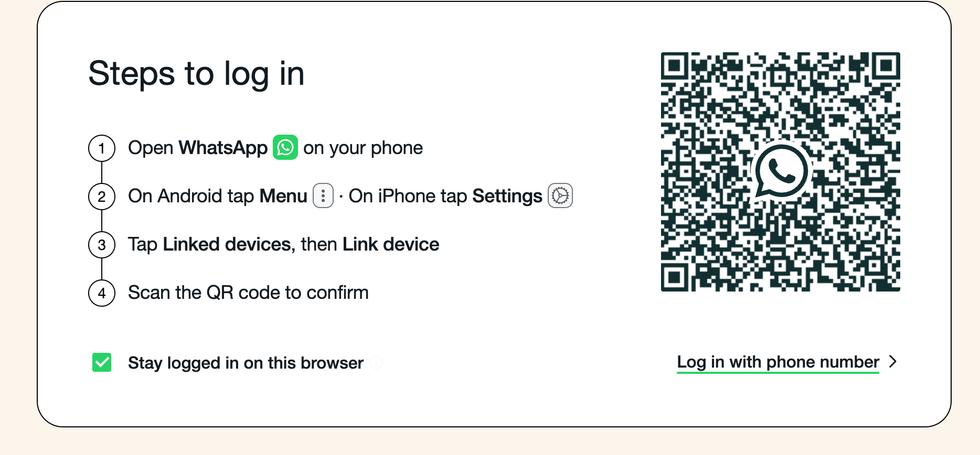
This popular WhatsApp feature gives you the ability to link additional devices to your account, which hackers are exploiting
|WHATSAPP PRESS OFFICE
What makes this threat particularly dangerous is that you might remain completely unaware of the breach for months. The scam typically begins when you receive a message from someone you trust, often containing a link with text suggesting they have found a photo of you. If you happen to click the link, it takes you to a webpage designed to look like Facebook, complete with a convincing link preview.
This fraudulent website asks you to verify your identity before viewing the supposed image. In reality, you are being guided through WhatsApp's device-pairing process without realising it.
For example, the fake site will prompt you to enter your phone number on the fraudulent site, which triggers a genuine pairing request from WhatsApp.
If you were genuinely linking your device, you'd be sent a code to input into the app. Instead, the attackers then display the resulting code on their fake page, instructing you to input it into your WhatsApp app.
By completing this process, you unknowingly authorise the criminals to add their browser as a linked device on your account. WhatsApp does display a notification stating a new device is being connected, but security researchers note that many users either miss this warning or fail to understand its significance.
Once paired, attackers gain complete access to your private conversations, voice notes, photographs and contact list. They can read your messages as they arrive, download media you share, and send communications that appear to originate from you.
This access opens the door to impersonation, targeted fraud and even extortion.
Compromised accounts will then automatically spread the scam by sending identical lure messages to your friends, family and group chats.
LATEST DEVELOPMENTS
To protect yourself, regularly check your WhatsApp settings by navigating to Linked Devices and removing any connections you do not recognise.
Remove these unknown connections by following these steps:
- Open WhatsApp on your phone.
- Tap the three dots (Android) or Settings (iPhone).
- Select Linked Devices.
- Review the list of devices currently linked to your account.
- Tap on any device you do not recognise.
- Select Log out or Remove to disconnect it.
Repeat this check regularly to ensure no unknown devices remain linked. You should also treat any website requesting you to scan a QR code or enter a pairing code with immediate suspicion.
If you're ever unsure of a link sent by a normally trusted family member or friend, it's always best practice to pick up the phone and call them on a trusted number and verbally verify that they really did send it
|PEXELS
Enabling two-step verification adds an extra layer of security to your account, too. Follow these instructions to enable them:
- Open WhatsApp on your phone.
- Tap Settings (iPhone) or the three dots menu (Android).
- Select Account.
- Tap Two-step verification.
- Choose Enable.
- Create a six-digit PIN and confirm it.
- Add an email address for recovery (recommended).
- Tap Done to finish setup.
After enabling two-step verification, WhatsApp will now periodically ask for your PIN, adding an extra layer of security to your account.
If you're ever unsure of a link sent by a normally trusted family member or friend, it's always best practice to pick up the phone and call them on a trusted number and verbally verify that they really did send it.
More From GB News