











Microsoft pulled the plug on its immensely popular Windows 10 operating system late last year, marking the end of a decade of support. Despite that, the most recent figures from Statcounter show that over 44% of all PC owners who rely on the Microsoft operating system are still using Windows 10.
Without additional steps — and in some cases, a one-off £22 payment — relying on Windows 10 in 2026 could put your data, including your credit card information, family photos, and more, at-risk from cybercriminals. Microsoft execs stated that Windows 10 users would find themselves at increased risk when the support ended.
If you haven't taken action, you're leaving yourself vulnerable to an increased risk of malware, ransomware, cyberattacks, and worse. That's because, without regular security updates and bug fixes from Microsoft, there's nothing to stop criminals from exploiting vulnerabilities unearthed within the operating system.
With so much personal data stored on PCs, such as financial information, passwords, and family photographs, this isn't a device that you want to leave exposed. The good news is you can still act. Microsoft will still issue monthly security updates to patch bugs and loopholes found in Windows 10, keeping you safe for another year.
However, unlike what you've been accustomed to over the last decade, these updates are not available free of charge. Dubbed Extended Security Updates (ESU) programme, this will roll out crucial security patches until October 13, 2026, so you have a little more breathing room to plan your next move, while keeping your current machine protected from serious threats.
 In the UK, Microsoft offers a few different ways to pay for its one-year Extended Security Updates (ESU) subscription, including choosing to backup your PC data via OneDrive | MICROSOFT PRESS OFFICE
 For everyday users, Microsoft charges £22 ($31) for its Extended Security Updates (ESU) scheme. For commercial organisations, the cost escalates quickly. Businesses will need to spend around £45 ($61) per device for the first year. That price doubles every consecutive year, for a maximum of three years.
There is a way to enjoy the additional security offered by the Extended Security Updates (ESU) without paying that fee — even if you live outside of the European Union.
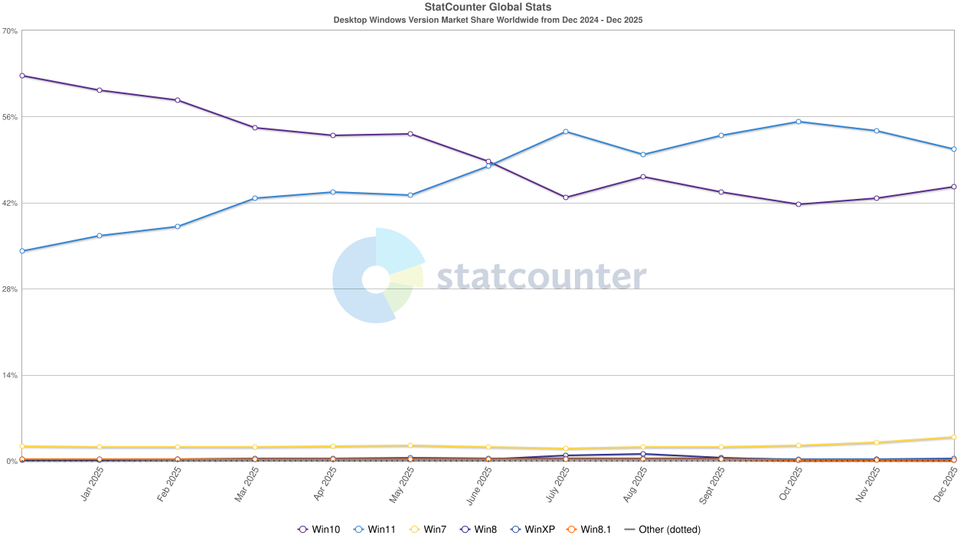
The percentage of all Windows users who rely on Windows 10 has slowly dropped, but at over 44.4% of all 1.5 Windows devices in use worldwide, that still represents millions of people
|STATCOUNTER | GBN
There are two ways to enrol in ESU that won't cost you a penny. Here's what's available:
Microsoft Rewards points – Cash in 1,000 points from Microsoft's loyalty scheme to get one year of protection. You earn these points by using Microsoft's various services. For example, downloading the Bing app will unlock 500 points, while playing games via Xbox Game Pass will net another 500 points each month
OneDrive backup – Perform a Windows Backup via OneDrive. This option is free, though there's a catch. You only get 5GB of storage without paying, so if your backup exceeds that, you'll need to purchase additional space. Fortunately, you can control what syncs to stay within that free limit. Head to your OneDrive settings and toggle off folders like Documents, Pictures, and Videos if you don't need them stored in the cloud
The clock is ticking. Each week that passes without protection on Windows 10 leaves your personal data, banking information, and files more exposed to potential threats.
@gbnews There are fewer than 150 days until Windows 10 reaches its end-of-support deadline. From October 14, 2025, onwards, Microsoft will no longer issue free software updates to fix vulnerabilities, bugs, and critical glitches in the desktop operating system. Without these, Microsoft warns that anyone who continues to use Windows 10 will be left "at greater risk for viruses and malware". Despite a recent U-turn to delay the same support deadline for Microsoft Office apps by three years, the Redmond-based company has refused to budge on its decision to halt vital updates for Windows 10. #News #Microsoft #MicrosoftOffice #Windows10 #Windows #UKNews #GBNews
Need vital security patches via Extended Security Updates? You're not alone.
Despite a recent surge in Windows 7 downloads, roughly 44% of all Windows computers worldwide continue to use the older operating system, which means vast numbers of users need to take action soon. According to research from Which? as many as 5 million people could be exposed in the UK alone.
You need to understand what you're getting, since ESU isn't quite the same as full Windows 10 support, which ended on October 14, 2025. The programme covers essential security updates only. You won't receive any shiny new features or access to Microsoft's technical support team. It's a pretty barebones experience.
Think of it as basic protection rather than comprehensive care. The updates focus solely on plugging security holes that hackers might exploit to access your system.
For many users, that's perfectly adequate. You can continue using your computer safely for everyday tasks like browsing, emails, and working on documents without worrying about major security breaches.
The programme is currently available to all individual users with Windows 10 devices running version 22H2 — the final update for the desktop operating system rolled out earlier this month. You'll find the enrolment wizard for the Extended Security Update in the Settings menu.
Our Standards: The GB News Editorial Charter