









WhatsApp is working on an update that'll let you restrict who can see your mobile number. Since its launch in early 2009, WhatsApp has required a valid phone number to create an account or add new contacts.
But that could be about to change.
The most popular messaging app on the planet, now owned and operated by Facebook and Instagram's parent company Meta, first confirmed plans to introduce usernames back in late 2024.
"Usernames on WhatsApp will add an extra degree of privacy so that you don’t need to share your phone number when messaging someone," the company stated in its blog. It's been over a year since that news broke, and now, usernames could finally make it into the iPhone and Android apps.
The eagle-eyed team over at WABetaInfo recently uncovered screenshots from an early beta that demonstrate how this will work. It seems WhatsApp will let you pick and reserve your own username.
Rather than using a mobile number to add you on WhatsApp, new contacts will be able to kickstart new one-on-one conversations, group chats, or business messages by dishing out a username. This lets you protect your privacy and maintain control over who has access to your personal information by masking your identity.
The topic of digital security has been at the top of everyone's minds lately. News of progress on the username feature in WhatsApp comes as the UK is planning to roll out the use of Digital IDs, requiring personal data such as your name, date of birth, information on nationality or residency status, and a photo of yourself. Many are against this, with nearly 2.7 million Britons having signed a petition opposing the plan.
Here’s how WhatsApp is stepping up its security to better protect its users.
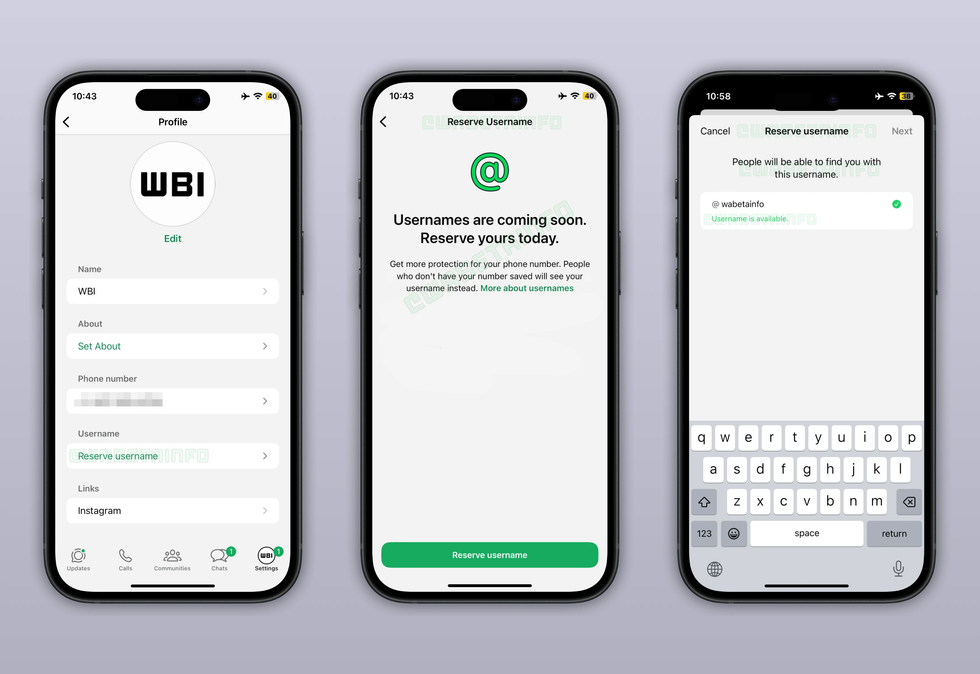
Your username will appear in a new section within your profile tab once the feature goes live, right under the phone number section
|From the photo WABetaInfo captured above, it seems like your username will eventually appear within a new section in the You tab in the bottom right-hand corner of the app. If you still have numbers saved for all of your contacts, then nothing will change when this long-teased update finally rolls-out.
However, if someone doesn't have a phone number saved for you, they'll only see the WhatsApp username.
This makes sharing your contact details much simpler and safer. You won't need to worry about giving out personal information when you're meeting new people or networking.
The feature builds on the secure PIN protection system — a two-step verification process that adds a second layer of security to your account. It's the reason that you'll sometimes see a message in your conversations that reads "Your security code with [Name] has changed" usually when a contact has reinstalled WhatsApp, changed phones, or added/removed a linked device.
To ensure this extra layer of protection remains in place, even if someone knows your username, they'll need to enter your specific code before they can start messaging you. This gives you complete control over who can actually reach out and start a conversation with you on the platform.
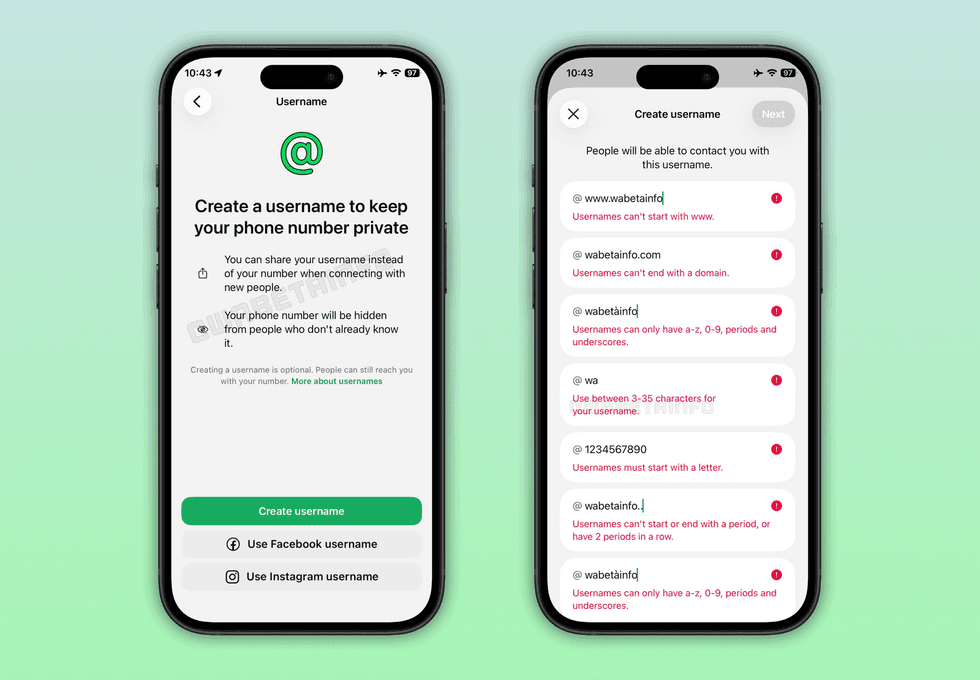
Recent leaks suggest your username will need to be between three and thirty characters long. You can't start or end it with a period, and it can't begin with "www" or end with domain extensions like ".com" or ".net".
|You'll need to follow specific rules when creating your username, too. It must contain at least one letter and can include lowercase letters, numbers, periods and underscores.
It also needs to be between three and thirty characters long. You can't start or end it with a period, and it can't begin with "www" or end with domain extensions like ".com" or ".net".
These guidelines are designed to help prevent impersonation attempts. Each username must be unique across the entire platform, and you won't be able to use a name that's already in your contact list.
One thing to note is that your chosen username needs to be free across all of Meta's platforms – that means WhatsApp, Instagram, and Facebook. If nobody's using it anywhere, you can grab it straight away.
If you already use the username you want on Instagram or Facebook, then you'll need to prove it's actually yours by linking everything through Meta's Accounts Centre.
This hub lets you connect all your Meta accounts in one place.
Using the same username everywhere might make it easier for people to find you across platforms. If you'd rather keep these separate, then it might be better if you pick something different.
LATEST DEVELOPMENTS
However, it also means that if someone has already claimed the username that you'd like to use on another Meta-owned platform — you'll miss out on WhatsApp.
Of course, all of this information is based on screenshots from a beta version of WhatsApp that's currently in testing. There's a chance some of these requirements, functionality, or designs will be changed ahead of a worldwide release – so take everything with a healthy pinch of salt.
As usernames are still in testing mode for both Android and iOS, there's no exact release date yet. Whispers from inside the chat app suggest it could launch as early as June, but that's not confirmed.
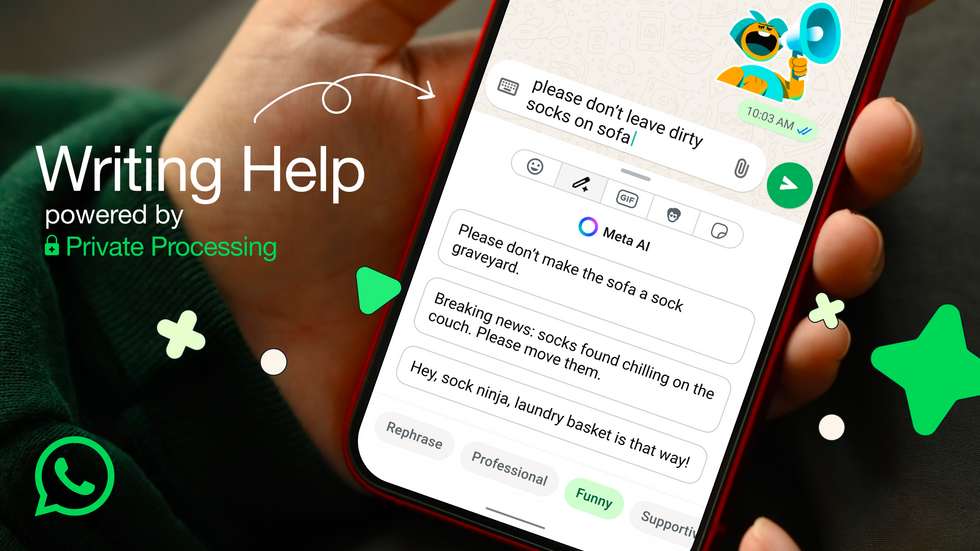
WhatsApp is constantly launching new updates and features, too. Most recently, it came out with the ability to rewrite your text messages for you.
| WHATSAPP PRESS OFFICEWhatsApp is constantly launching new updates and features, too. Most recently, it came out with the ability to rewrite your text messages for you. Called Writing Help, WhatsApp can transform your texts with Artificial Intelligence (AI) while keeping your conversations completely private.
They also recently rolled out the ability to schedule calls in advance, so you'll never miss an important conversation again.