










One of the biggest worries about Electric Vehicles (EVs) is the fear of running out of juice before your destination... or a fast-charging station. But Google hopes that fretting about your car's battery mid-journey could become a thing of the past.
Its immensely-popular Google Maps app has just rolled out clever new Artificial Intelligence (AI) charging features for more than 350 Android Auto car models. These are electric vehicles (EVs) that allow you to plug in (or wirelessly connect) your Android phone to display its apps on the car’s built-in infotainment screen. This means Google Maps will now tell you exactly when and where to stop for a charge, based on your specific vehicle and current battery level. It's ideal for anyone who's ever felt that familiar nagging fear that their battery won't make it to the next charging point.
Here's exactly how it works with your commute.
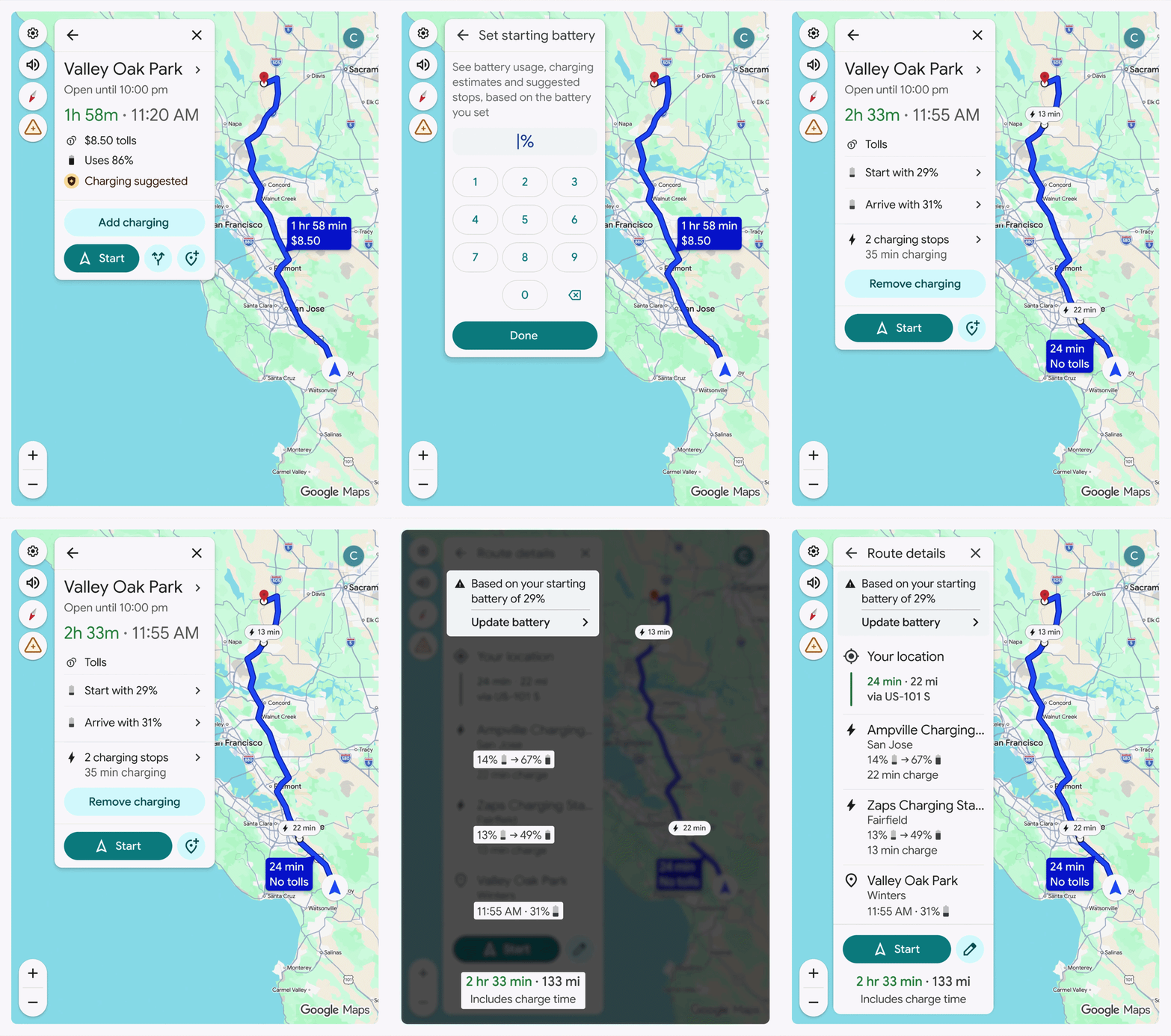
Google Maps will now tell you exactly when and where to stop for a charge, based on your specific vehicle and current battery level
|GOOGLE PRESS OFFICE
First, you'll need to add your EV details to Google Maps, then set your destination while you're in the car.
Google published steps on their Support Page.
- On your mobile device, open the Google Maps app
- Tap your profile picture or initial > Settings > Your Vehicles
- Under “Engine type,” tap Electric
- Under “Vehicle,” tap Add vehicle
- To select the correct info for your EV, tap each category: Make, Model, Year, and Trim
- Under “Your plugs,” confirm the plugs are correct.
- To edit your plugs, tap Edit
- Tap Save
The app will then show you how much battery you're likely to use on your trip.
LATEST DEVELOPMENTS
Once you've entered your current charge level, Maps works out the best places to stop and plug in.
It'll also tell you roughly how much battery you'll have left when you arrive, plus an updated arrival time that factors in any charging stops.
The app is built to achieve this by using AI combined with clever energy models that look at your car's specific details – things like how heavy it is and the size of your battery. It then mixes this with live information about traffic conditions, the weather, and even how hilly your route is.
Google has confirmed that this new feature will only be available in the US right now. There has been no confirmation on when this will be expanded to other regions.
 Google is rolling out Gemini-powered AI directly inside Google Maps as a way to enhance how you drive and explore with several new features | GOOGLE PRESS OFFICE
This isn't the only update Google has planned.
Google has unveiled its biggest overhaul to Google Maps in years, bringing a slew of new features powered by its AI assistant, Gemini. According to the Californian company, the incoming shake-up will be "fundamentally changing what a map can do".
Gemini is similar to the recent rollout of Alexa+ in the UK, bringing a swathe of new AI features to the chatty assistant built into millions of Echo smart speakers, Fire TVs, and Echo Show smart home kit.
The arrival of Gemini means you'll be able to speak to Google Maps in natural language. So, instead of dictating the destination as you've been able to do in Google Maps since the introduction of voice-activated searches in 2008, you'll now be able to pose a problem to the navigation software.
For example, you could say, “My phone is dying — where can I charge it without having to wait in a long line for coffee?” or “Is there a public tennis court with lights on that I can play at tonight?” Until now, this would've required sifting through dozens of listings and reviews, or searching on Google to find the right location.
Google also has yet to announce Gemini's arrival on Maps in the UK. Stay tuned to GBN Tech as we monitor Google's continued rollouts and expansions to other regions.