










Microsoft is rolling out a game-changing new update for PCs worldwide.
Dubbed Xbox Mode, the new functionality takes over everything on-screen, offering an almost identical experience to an Xbox Series X or Series S console on any laptop or desktop PC. For those who play video games on Windows 11, this new mode promises to be a one-stop-shop for all of your gaming needs.
Xbox Mode is optimised for a controller, so you'll be able to navigate your library of games with an Xbox controller without reaching for the mouse or keyboard. Like the latest generation of Xbox consoles, Windows 11's new Xbox Mode is deeply integrated with Game Pass, the Netflix-like subscription service that offers access to the latest blockbuster titles from Microsoft's vast array of game studios.
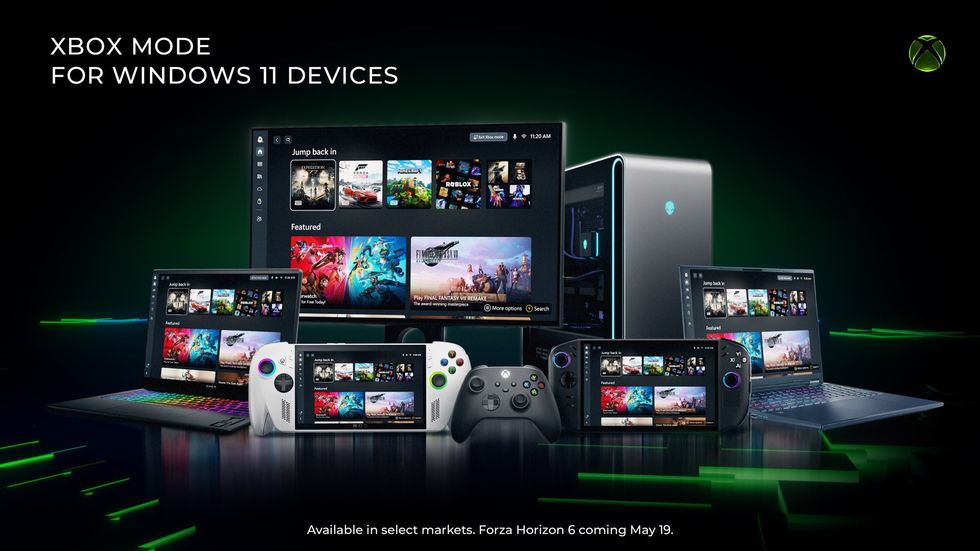
Xbox Mode is designed to ensure players have the same console-like experience across Xbox Series X|S consoles, handhelds from ASUS, laptops and desktop PCs, and more
|MICROSOFT PRESS OFFICE
You can also find titles installed from other storefronts, like Steam. Microsoft first started work on the full-screen Xbox Mode interface ahead of the launch of the Asus ROG Xbox Ally X handheld, which competes head-to-head with the Steam Deck, but is powered by the Windows operating system.
Microsoft says it's easy to bounce back and forth between Xbox Mode and the standard Windows 11 experience. If you primarily rely on your desktop PC to play games, it's possible to boot up into Xbox Mode and enjoy a console-like experience.
Xbox wireless controllers can be paired with PCs via Bluetooth or using a UBC cable.
LATEST DEVELOPMENTS
- Google's new Gemini Spark AI can manage your Gmail and make purchases for you
- Update to Freeview switches around three of your channels
- 10 exciting new Android 17 features confirmed by Google
- Best VPN deals
- Googlebook is a new type of AI-packed laptop to challenge Windows 11
- Spotify issues statement over controversial Disco Ball logo change
Writing in a blog post about the new functionality, Jason Ronald, who serves as Xbox Vice President of Next Generation and Ian LeGrow, Corporate Vice President for Windows and Devices, state: "Whether you’re playing on a high-performance desktop, a gaming laptop, or a Windows handheld, Xbox mode makes it easier to jump into your games."
"Xbox mode is another step in our broader work to make Xbox feel consistent across screens while giving you more choice in how and where you play. Windows has long been an important part of the PC gaming ecosystem, supporting innovation through its open platform.
"Together with Windows, Xbox is taking everything we’ve learned about building a world-class operating system for gaming and continuing to evolve the experiences that meet players where and how they choose to play."
How to Get Xbox Mode on Your Windows 11 PC
Xbox mode is rolling out gradually to ensure a great experience for everyone. To get access as soon as it becomes available for your PC, make sure your device is set to receive the latest Windows updates:
- Open Settings on your Windows 11 PC
- Select Windows Update
- Turn on Get the latest updates as soon as they are available
Once the update is available on your device, you will be able to jump into Xbox Mode immediately and start playing.