








Struggling to log in to Outlook or Hotmail email address today? You're not alone.
Hundreds of Microsoft Outlook users have reported problems with the popular email client every minute, as tracked by DownDetector. The latter is an independent service that monitors the performance of online tools and services by tracking social media reports of issues from real users. In the last four hours, Outlook has seen a surge of reports.
The dramatic rise in login errors impacts Outlook.com, Hotmail.com, and Hotmail.co.uk email addresses in the UK, United States, mainland Europe, and beyond. At its peak, DownDetector was tracking 866 reports from Outlook users unable to access their inbox every minute.
Resetting your password does not solve the problem, according to disgruntled users on social media.
The issue is not limited to iOS, Microsoft claims, but iPhone owners seem to be the largest contingent locked out of their inbox. The glitch means iPhone users who check their Outlook or Hotmail within the default Mail application installed on every iOS device are being asked to re-enter their password multiple times.
Microsoft has issued an 8-step process to rectify the situation.
iOS users on iPhones MUST take the following steps to re-enter their password and access their accounts:
- Open the Settings app on your iPhone
- Scroll down and tap on Mail
- Select Accounts under the Mail settings
- Tap on the email account for which you need to re-enter the password
- Tap on Account Settings or directly on the Password field (depending on your iOS version)
- Enter the updated or correct password in the Password field
- Tap Done to save the changes
- Open the Mail app to confirm that the account is syncing properly and emails are being sent/received.
Final status: iOS users MUST take the additional steps listed in the "More info" section above to resolve impact.
Microsoft says it has now "confirmed service health has returned to normal", so the issues that caused these repeated login errors should now be fixed on its side. It claims that "users who have completed the additional steps" listed above and via a screenshot on its official steps, are now able to access Outlook and Hotmail.
We’ve confirmed service health has returned to normal and reporting users that have completed the additional steps are able to access Outlook and Hotmail. For the list of mitigation steps and more information, please review the attached screenshot or visit… pic.twitter.com/YHp86VTOYD
— Microsoft 365 Status (@MSFT365Status) April 27, 2026
Despite Microsoft's claim that it has fixed everything on its side, either there are large numbers of iOS users who haven't followed the 8 steps outlined above, or some Outlook and Hotmail users are still struggling to access their inboxes. That's because — almost 24-hours since the initial issues — DownDetector still shows a substantial number of reports about issues with the email client ticking along.
At the time of writing, DownDetector still shows 430 reports every minute.
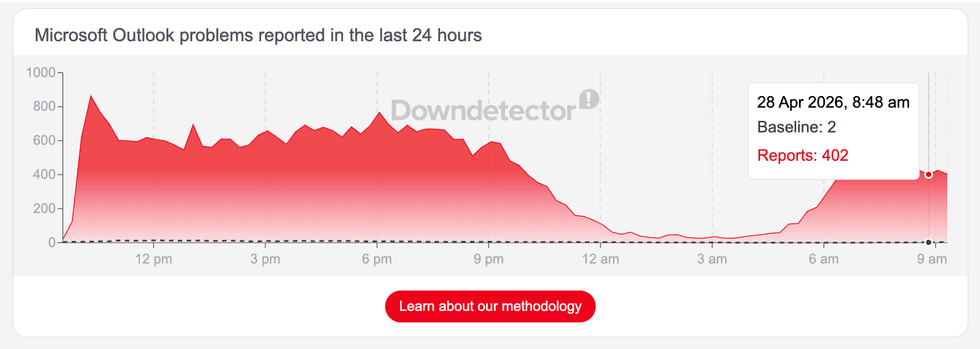
Outlook users have flocked to social media websites, like X and Threads, to complain about the issues with Microsoft's immensely popular email client
|DOWNDETECTOR
Over half (59%) of all issues reported by disgruntled Outlook users today are related to logins, DownDetector data shows. The remaining complaints centre on the app and receiving emails, at 21% and 19%, respectively.
Microsoft has conducted its investigation into the "unexpected increase" in errors from those trying to sign in to Outlook. Trying to launch the app has resulted in error messages and unexpected logouts. Microsoft 365 Business and Enterprise customers seem to be the worst hit, with everyday users able to swerve the trouble.
According to the Microsoft 365 service status dashboard, everything outside of Outlook is working well.
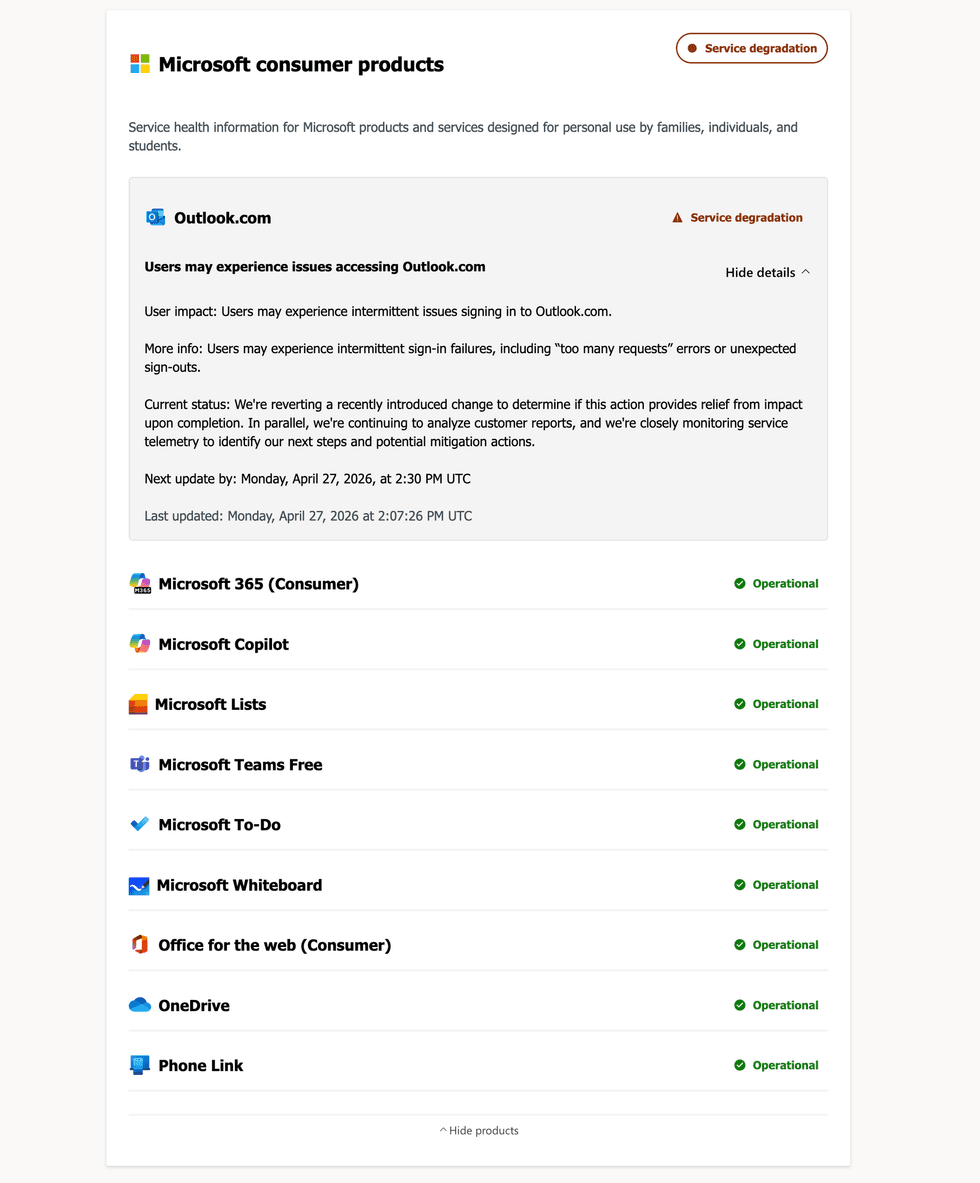
Other Microsoft 365 apps should be working fine, with only Outlook experiencing issues
On X, formerly Twitter, the Microsoft 365 Status account — which posts about any issues that impact apps and services included with the Microsoft 365 suite of apps — shared: "We've discovered some users may experience intermittent sign‑in failures, including 'too many requests' errors, or unexpected sign‑outs. We're analysing service telemetry further to identify any potential next steps and mitigation actions."
It followed up this post with: "Upon reviewing service telemetry further, we've identified an unexpected increase in error rates affecting two separate error scenarios. We suspect this may be contributing to creating impact, and we're conducting additional analysis to confirm this."
On the Service Status dashboard, Microsoft has shared a little more information:
Users may experience issues accessing Outlook.com
User impact: Users may experience intermittent issues signing in to Outlook.com.
More info: Users may experience intermittent sign‑in failures, including “too many requests” errors or unexpected sign‑outs
Current status: We're reverting a recently introduced change to determine if this action provides relief from impact upon completion. In parallel, we're continuing to analyze customer reports, and we're closely monitoring service telemetry to identify our next steps and potential mitigation actions.
Outlook users have flooded X with complaints about the issues with the email client. One posted: "When will this be sorted I’ve got some urgent documents I need to view and sent. iPhone keeps asking for my password, I add the password which I know is correct. Yet says too many attempts which is incorrect."
"Please for the love of all thats good fix this. I keep getting locked out of my account because apparently some mysterious person(s) have tried too many times to login. Its infurirating," another added.
Microsoft Outlook last experienced a major outage back in January.