


All products and promotions are independently selected by our experts. To help us provide free impartial advice, we will earn an affiliate commission if you buy something. Click here to learn more







The next time you Google something ...you might want to enable a clever security watchdog.
Surfshark, which already ranked as one best VPN deals in 2026, just unleashed a free browser extension designed to preemptively flag links to dodgy websites within your Google search results – before you even click on them. The clever security feature is designed to keep you protected without adding any extra steps to your Google searches. The warnings pop up automatically as you browse through search results.
The best way to prevent malware, identity fraud, or password theft is to prevent users from clicking on the dodgy link. Anti-virus and other security software can be a useful tool in the arsenal, but it's more hassle to scrub this malicious software or recover your personal data after the fact.
It's much easier to block the attack in the first place, which is exactly what Surfshark wants to do.
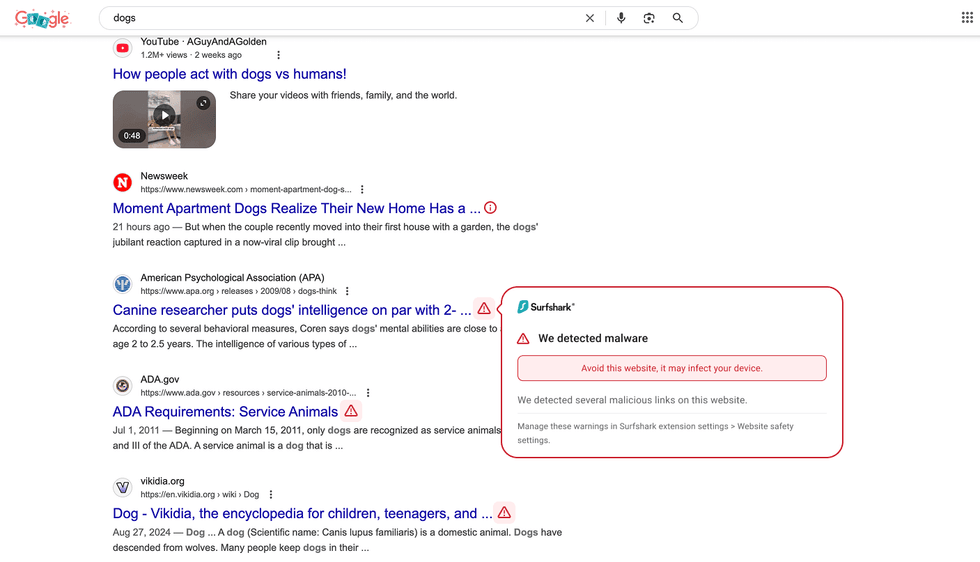
Before you even click on a result in Google, Surfshark will flag any potential dangers that might be lurking behind the link
|SURFSHARK PRESS OFFICE
Head of Product at Surfshark, Gabriele Sinkeviciute explained: "It's hard to imagine a day without using a search engine like Google. However, even seemingly harmless searches can lead to risks behind any link you click.
"To address this, we've implemented a new feature designed to help people browse more securely without any extra effort by proactively informing users if a link they're about to click has been involved in a data breach or may contain potential threats like malware."
This update may not come at a better time, either.
Surfshark spotted more than 141,000 fresh online threats in 2025 alone, which shows just how risky clicking random links can be these days. Thousands of Chrome users have also just had their passwords stolen, and Android users were put on red alert as malware has been found hiding in their streaming apps.
Secure your Google searches with a subscription to Surfshark

You can protect yourself during Google searches with a subscription to Surfshark. For a limited time, it's slashed 87% off its monthly cost and coupled that discount with three months of free access. You'll need to sign up for a two-year plan to unlock this saying, but with a 30-day money-back guarantee and 24/7 customer service, there's no risk for new customers.
Before the rollout of the new feature, you could only see safety badges after visiting a webpage. Now the security status appears directly in your search results, catching threats at the earliest possible moment.
The feature works by displaying small icons beside each link in your Google search results. These symbols give you an instant heads-up about various dangers lurking on websites — including data leaks, breaches, malware, and phishing scams.
And that's not the only new addition to the Google Chrome extension from Surfshark. Data breach alerts notify you if a website has leaked user data in the past.
You’ll see this information in a banner right under the search bar after visiting the page. You can click on it for more information about the breach – the ideal prompt to change your password, or not use the website in question.
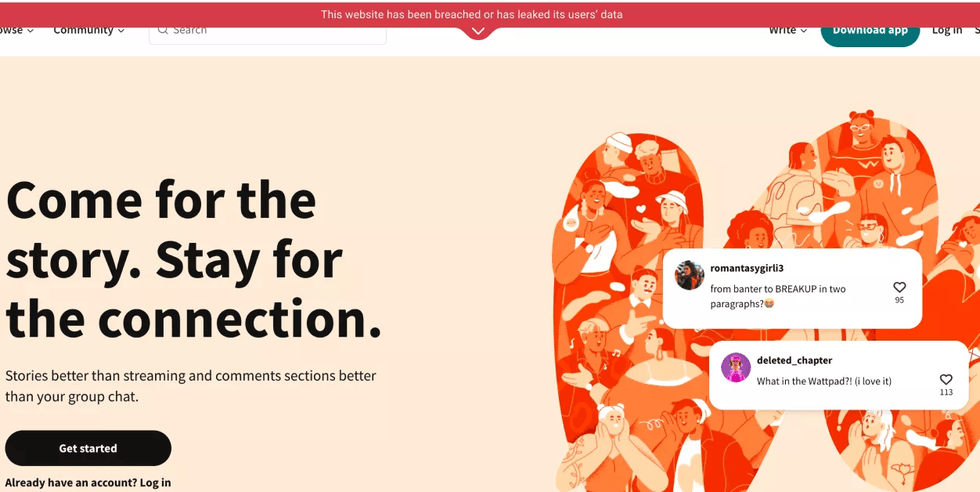
If you do accidentally end up on a site that's previously mishandled users' data, Surfshark will flash a warning at the top of the screen
|SURFSHARK PRESS OFFICE
Ms Sinkeviciute added: "Protecting users from malicious search engine links is just as critical as providing reliable online protection for their data. Since 2022, for instance, we have added over 25,000 websites to our database that are flagged as potentially harmful and are not easily identifiable as dangerous."
LATEST DEVELOPMENTS
To take advantage of this new feature, follow these instructions.
First, head to the settings of your Surfshark Chrome extension. Then, find the website safety warnings section, and make sure both toggles are switched on. The company notes that many harmful sites aren't easily identifiable as dangerous, which is exactly why having automatic warnings makes such a difference. This new feature is set to give you protection without needing the help of a cybersecurity expert yourself.
If you choose to enable only the data breach alert option within the website safety settings, Google search results will be scanned exclusively for data breaches and leaks. Likewise, if you activate only the malware alert, results will focus solely on detecting malware and phishing threats.
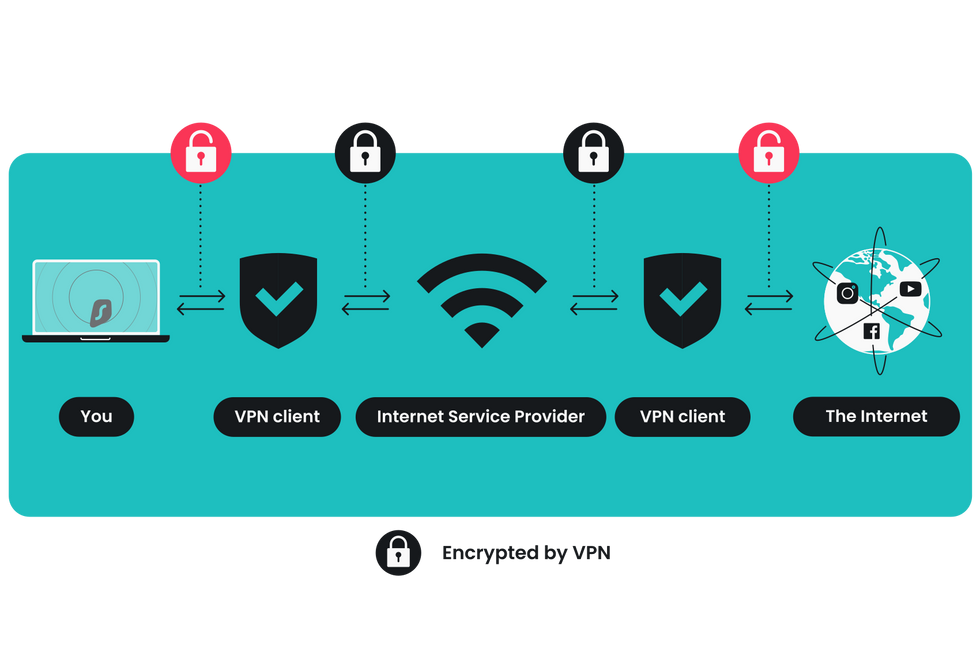 VPNs work by encrypting all of your online traffic before it's sent over the internet. This prevents your ISP, advertisers, hackers, and fraudsters from tracking your online activity, stealing your personal data, or placing restrictions on you | SURFSHARK PRESS OFFICE
 What is a VPN?
A Virtual Private Network (VPN) is software that protects and anonymises everything you do online. VPNs can conceal your online activities by routing traffic through an encrypted tunnel that connects to secure servers worldwide.
The most reliable VPNs employ the same encryption standard as governments in the United Kingdom and the United States, ensuring that even your Internet Service Provider (ISP) connected to Wi-Fi cannot record the websites you visit, the duration of your sessions on each site, or your current location. This protection extends to advertisers, trackers, and hackers, preventing them from monitoring your online behaviour.
Furthermore, personal information entered into online forms and sensitive data transmitted to and from your device will be safeguarded from hackers using strong encryption provided by a VPN.